苍穹外卖学习笔记
一. 项目概述、环境搭建 1. 软件开发整体流程
需求分析 : 需求规格说明书、产品原型设计 : UI设计、数据库设计、接口设计编码 : 项目代码、单元测试测试 : 测试用例、测试报告上线运维 : 软件环境安装、配置
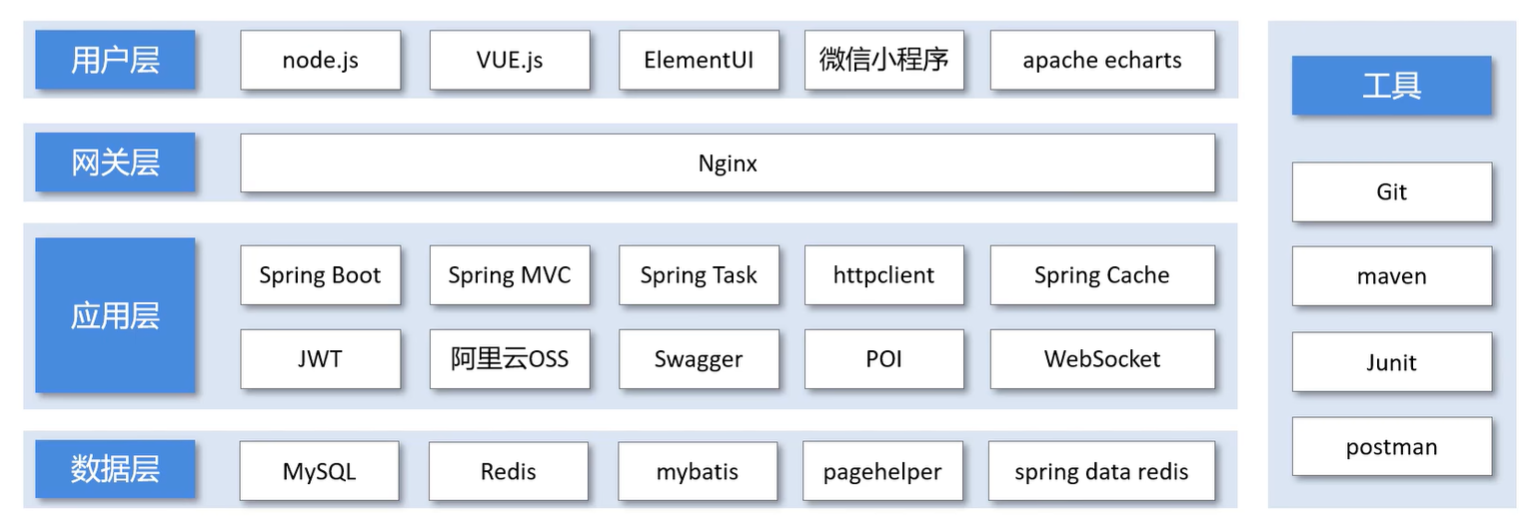
2. 技术选型 项目中使用到的技术框架和中间件
3. 开发环境搭建 3.1 前端环境搭建(nginx) 前端我们就不自己写代码了nginx.exe 运行,打开localhost:80端口访问前端页面
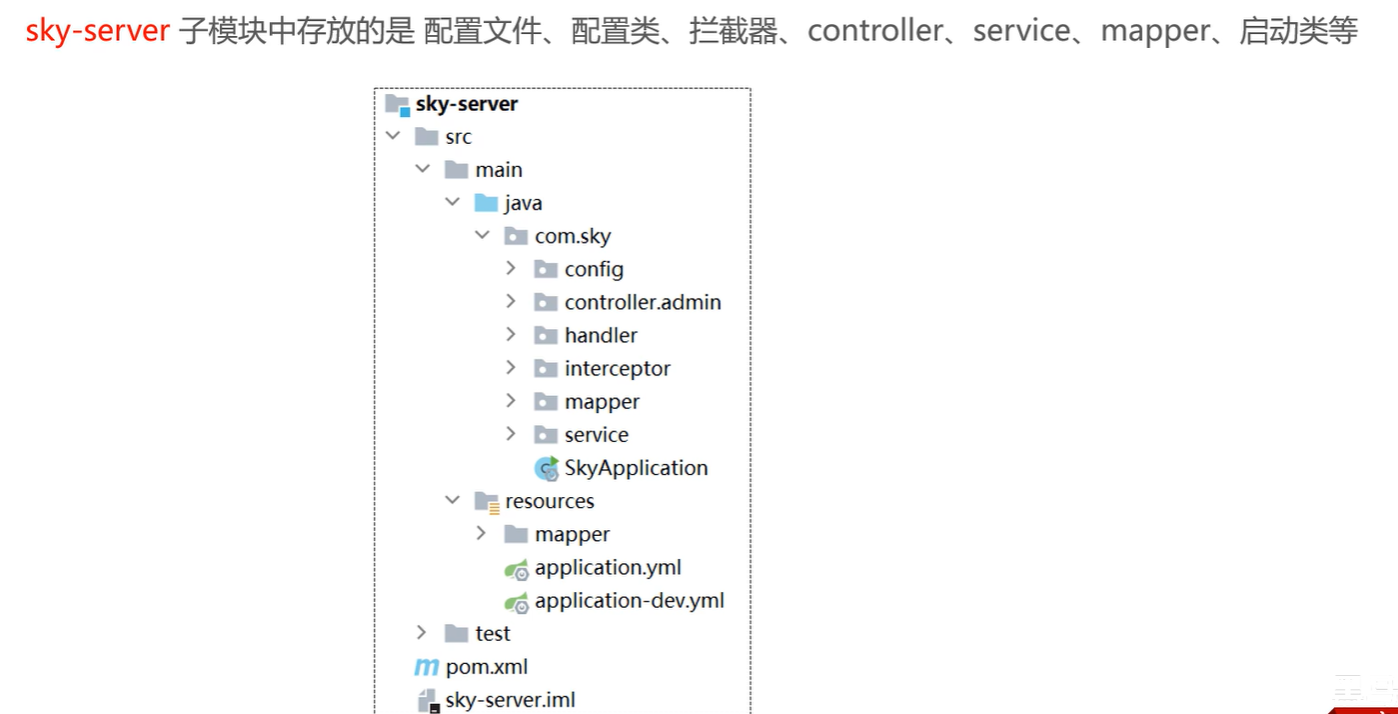
3.2 后端环境搭建 3.2.1 熟悉项目结构
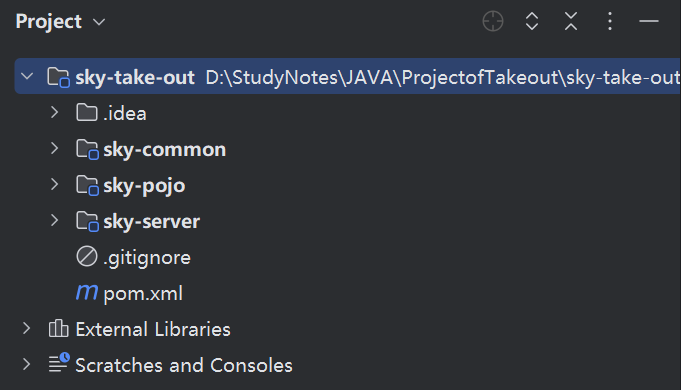
后端工程基于maven 进行项目构建,并且进行分模块 开发
用idea打开sky-take-out工程
序号
名称
说明
1
sky-take-out
maven父工程,统一管理依赖版本,聚合其他子模块
2
sky-common
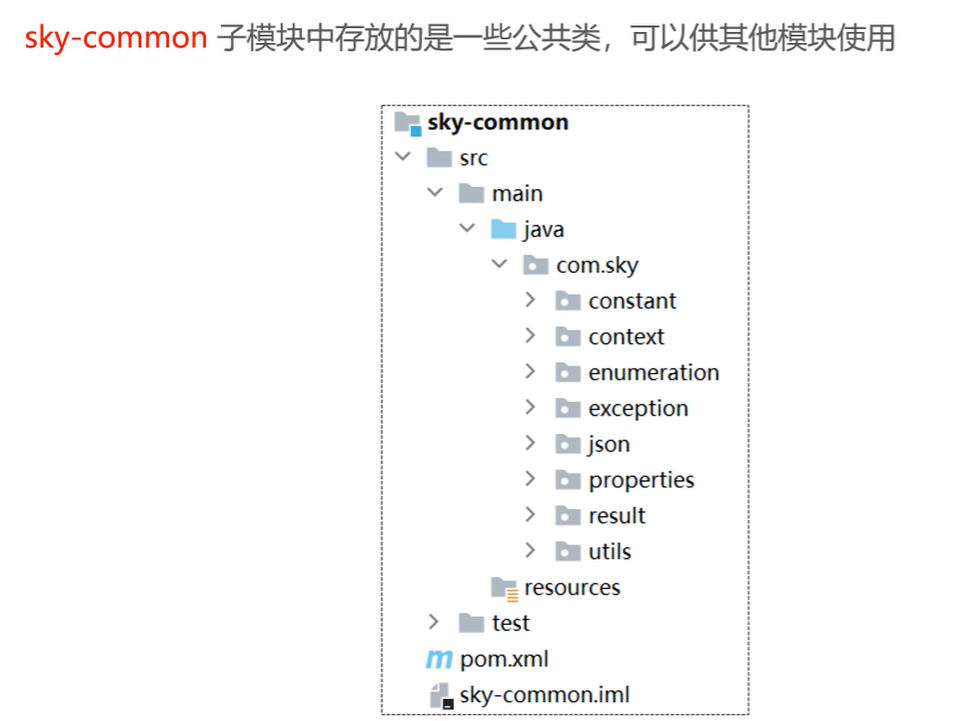
子模块,存放公共类,例如:工具类、常量类、异常类等
3
sky-pojo
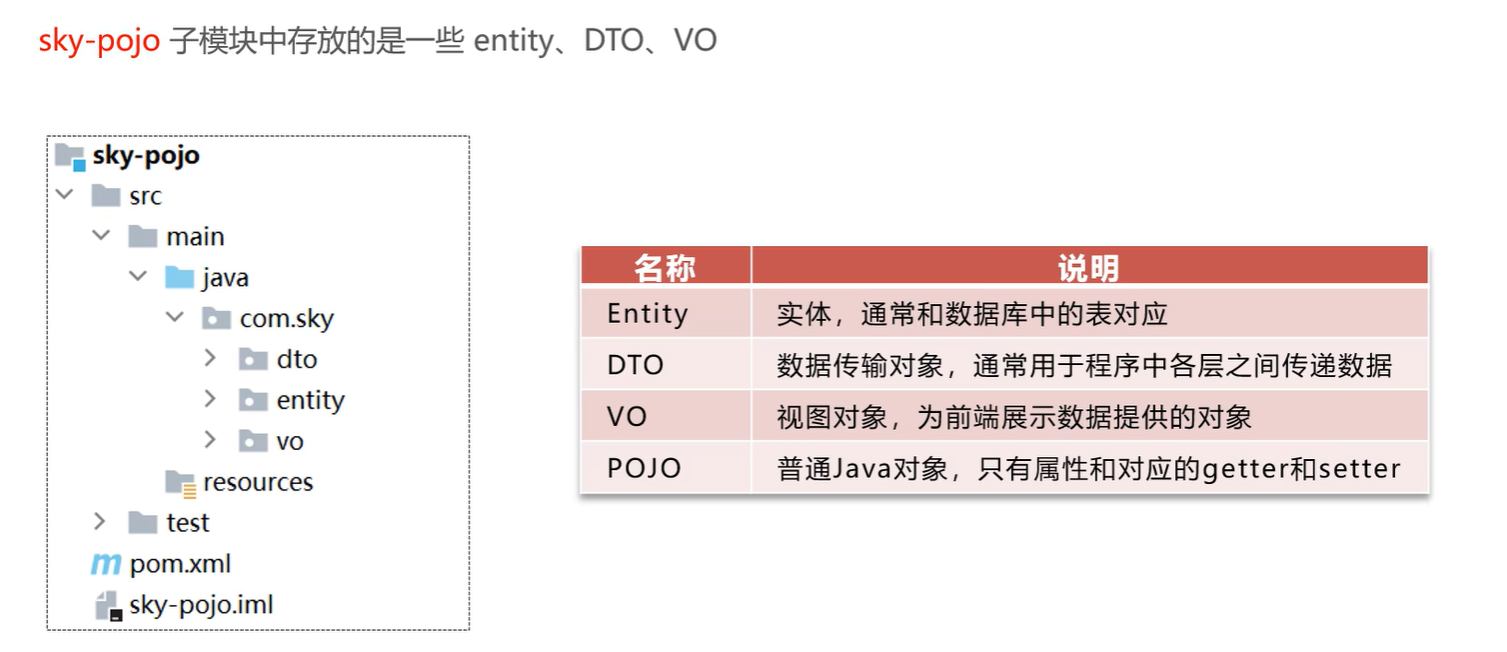
子模块,存放实体类、VO、DTO等
4
sky-server
子模块,后端服务,存放配置文件、Controller、Service、Mapper等
3.2.2 使用Git进行版本控制 Git学习笔记
3.2.2.1 创建本地仓库
点击菜单-VCS-Create Git Repository-找到当前项目目录-点击OK
将本地文件全部提交到本地仓库(commit)
3.2.2.2 创建远程仓库 打开Gitee,点击加号创建远程仓库
3.2.2.3 将本地文件推送到Git远程仓库 点击push,输入远程仓库url,输入账号密码,成功push
3.2.3 数据库环境搭建 记得在命令行中打开mysql连接:net start mysqlnavicat运行sql文件
3.2.4 前后端联调
nginx反向代理 :就是将前端发送的动态请求由nginx转发到后端服务器
3.3 完善登录功能 使用md5加密算法将明文123456加密:e10adc3949ba59abbe56e057f20f883e
1 password = DigestUtils.md5DigestAsHex(password.getBytes());
4. 导入接口文档 使用Apifox-导入-选择YApi-将json文件导入
5. Swagger
注解
说明
@Api
用在类上,例如Controller,表示对类的说明
@ApiModel
用在类上,例如entity、DTO、VO
@ApiModelProperty
用在属性上,描述属性信息
@ApiOperation
用在方法上,例如Controller的方法,说明方法的用途、作用
二. 员工管理、分类管理 1. 新增员工 1.1 员工的DTO类(EmployeeDTO) 1 2 3 4 5 6 7 8 9 10 11 12 13 package com.sky.dto;import lombok.Data;import java.io.Serializable;@Data public class EmployeeDTO implements Serializable {private Long id;private String username;private String name;private String phone;private String sex;private String idNumber;
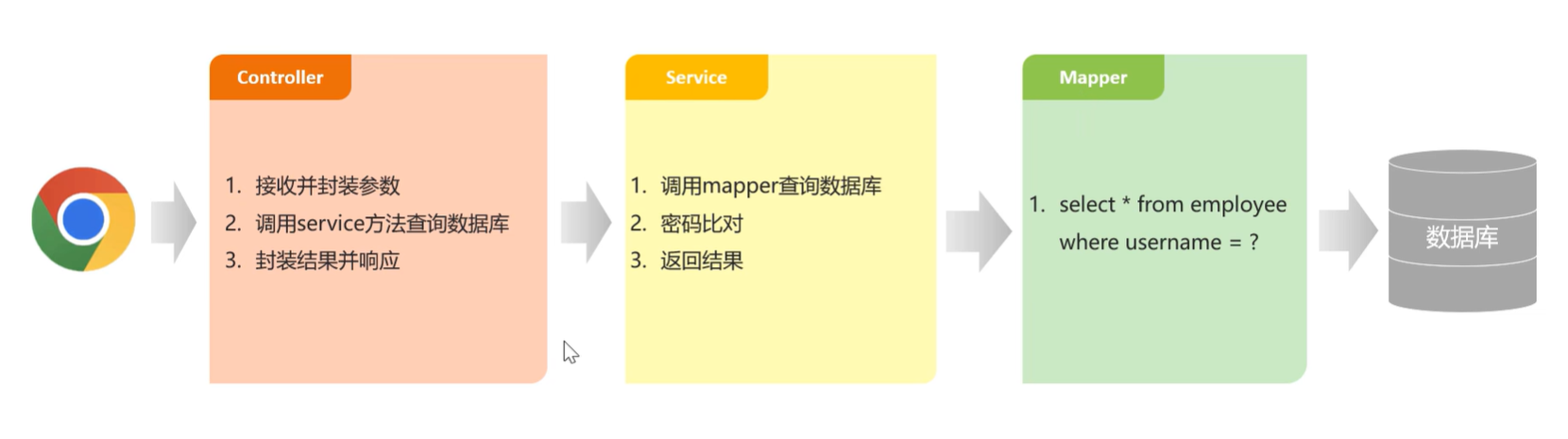
1.2 Controller层 在EmployeeController中创建新增员工方法 ,接收前端提交的参数。
1 2 3 4 5 6 7 8 9 10 11 12 13 14 @PostMapping @ApiOperation("新增员工") public Result save (@RequestBody EmployeeDTO employeeDTO) {"新增员工:{}" ,employeeDTO);return Result.success();
1.3 Service层 1.3.1 Service层接口 在EmployeeService接口中声明新增员工方法
1 2 3 4 5 6 7 void save (EmployeeDTO employeeDTO) ;
1.3.2 Service层实现类 在EmployeeServiceImpl中实现新增员工方法
1 2 3 4 5 6 7 8 9 10 11 12 13 14 15 16 17 18 19 20 21 22 23 24 25 26 27 28 29 public void save (EmployeeDTO employeeDTO) {Employee employee = new Employee ();
1.4 Mapper层 在EmployeeMapper中声明insert方法
中添加方法
1 2 3 4 5 6 7 8 9 @Insert("insert into employee (name, username, password, phone, sex, id_number, create_time, update_time, create_user, update_user,status) " + "values " + "(#{name},#{username},#{password},#{phone},#{sex},#{idNumber},#{createTime},#{updateTime},#{createUser},#{updateUser},#{status})") void insert (Employee employee) ;
1.5 处理SQL异常抛出
问题 :当录入的用户名已经存在时,抛出的异常后没有处理原因 :username已经添加了唯一约束,不能重复解决方案 :通过全局异常处理器处理
1 2 3 4 5 6 7 8 9 10 11 12 13 14 15 16 17 18 19 20 @ExceptionHandler public Result exceptionHandler (SQLIntegrityConstraintViolationException ex) {String message = ex.getMessage();if (message.contains("Duplicate entry" )){" " );String username = split[2 ];String msg = username + MessageConstant.ALREADY_EXISTS;return Result.error(msg);else {return Result.error(MessageConstant.UNKNOWN_ERROR);
1 2 public static final String ALREADY_EXISTS = "已存在" ;
1.6 ThreadLocal
ThreadLocal 并不是一个Thread,而是Thread的局部变量 。
ThreadLocal为每个线程提供单独一份存储空间,具有线程隔离的效果,只有在线程内才能获取到对应的值,线程外则不能访问。
常用方法
常用方法
作用
public void set(T value)
设置当前线程的线程局部变量的值
public T get()
返回当前线程所对应的线程局部变量的值
public void remove()
移除当前线程的线程局部变量
1.7 获取当前登录员工的ID
问题 :员工登录成功后会生成JWT令牌并响应给前端。后续请求中,前端会携带JWT令牌,通过JWT令牌可以解析出当前登录员工id:解决方案 :通过ThreadLocal进行传递。
1 2 3 4 5 6 7 8 9 10 11 12 13 14 15 16 17 18 19 20 21 22 @Component @Slf4j public class JwtTokenAdminInterceptor implements HandlerInterceptor {try {Claims claims = JwtUtil.parseJWT(jwtProperties.getAdminSecretKey(), token);Long empId = Long.valueOf(claims.get(JwtClaimsConstant.EMP_ID).toString());"当前员工id:" , empId);return true ;catch (Exception ex) {
2. 员工分页查询 2.1 员工分页查询的DTO 1 2 3 4 5 6 7 8 9 10 11 12 13 14 15 16 package com.sky.dto;import lombok.Data;import java.io.Serializable;@Data public class EmployeePageQueryDTO implements Serializable {private String name;private int page;private int pageSize;
2.2 Controller层 1 2 3 4 5 6 7 8 9 10 11 12 13 14 @GetMapping("/page") @ApiOperation("员工分页查询") public Result<PageResult> page (EmployeePageQueryDTO employeePageQueryDTO) {"员工分页查询,参数为:{}" , employeePageQueryDTO);PageResult pageResult = employeeService.pageQuery(employeePageQueryDTO);return Result.success(pageResult);
2.3 Service层 2.3.1 Service层接口 在EmployeeService接口中声明pageQuery方法:
1 2 3 4 5 6 pageQuery (EmployeePageQueryDTO employeePageQueryDTO) ;
2.3.2 Service层实现类 在EmployeeServiceImpl中实现pageQuery方法:
1 2 3 4 5 6 7 8 9 10 11 12 13 14 15 16 17 18 public PageResult pageQuery (EmployeePageQueryDTO employeePageQueryDTO) {long total = page.getTotal();return new PageResult (total, records);
2.4 Mapper层 在 EmployeeMapper 中声明 pageQuery 方法:
1 2 3 4 5 6 pageQuery (EmployeePageQueryDTO employeePageQueryDTO) ;
在 src/main/resources/mapper/EmployeeMapper.xml 中编写SQL:
1 2 3 4 5 6 7 8 9 < select id= "pageQuery" resultType= "com.sky.entity.Employee"> select * from employee< where > < if test= "name != null and name != ''"> and name like concat('%' ,#{name},'%' )< / if> < / where > order by create_time desc < / select >
2.5 日期格式化
问题 :操作时间字段显示有问题。前端显示的时间格式不标准解决方案 :在WebMvcConfiguration中扩展SpringMVC的消息转换器,统一对日期类型进行格式处理
1 2 3 4 5 6 7 8 9 10 11 12 13 protected void extendMessageConverters (List<HttpMessageConverter<?>> converters) {"扩展消息转换器..." );MappingJackson2HttpMessageConverter converter = new MappingJackson2HttpMessageConverter ();new JacksonObjectMapper ());0 ,converter);
3. 启用禁用员工账号 3.1 Controller层 1 2 3 4 5 6 7 8 9 10 11 12 13 14 @PostMapping("/status/{status}") @ApiOperation("启用禁用员工账号") public Result startOrStop (@PathVariable Integer status,Long id) {"启用禁用员工账号:{},{}" ,status,id);return Result.success();
3.2 Service层 3.2.1 Service层接口 1 2 3 4 5 6 7 void startOrStop (Integer status, Long id) ;
3.2.2 Service层实现类 1 2 3 4 5 6 7 8 9 10 11 12 13 14 15 public void startOrStop (Integer status, Long id) {Employee employee = Employee.builder()
3.3 Mapper层 1 2 3 4 5 6 void update (Employee employee) ;
在 EmployeeMapper.xml 中编写SQL:
1 2 3 4 5 6 7 8 9 10 11 12 13 14 15 < update id= "update" parameterType= "Employee"> update employee< set > < if test= "name != null"> name = #{name},< / if> < if test= "username != null"> username = #{username},< / if> < if test= "password != null"> password = #{password},< / if> < if test= "phone != null"> phone = #{phone},< / if> < if test= "sex != null"> sex = #{sex},< / if> < if test= "idNumber != null"> id_Number = #{idNumber},< / if> < if test= "updateTime != null"> update_Time = #{updateTime},< / if> < if test= "updateUser != null"> update_User = #{updateUser},< / if> < if test= "status != null"> status = #{status},< / if> < / set > where id = #{id}< / update >
4. 编辑员工 4.1 回显员工信息功能 4.1.1 Controller层 在 EmployeeController 中创建 getById 方法:
1 2 3 4 5 6 7 8 9 10 11 @GetMapping("/{id}") @ApiOperation("根据id查询员工信息") public Result<Employee> getById (@PathVariable Long id) {Employee employee = employeeService.getById(id);return Result.success(employee);
4.1.2 Service层 4.1.2.1 Service层接口 在 EmployeeService 接口中声明 getById 方法:
1 2 3 4 5 6 getById (Long id) ;
4.1.2.2 Service层实现类 在 EmployeeServiceImpl 中实现 getById 方法:
1 2 3 4 5 6 7 8 9 10 11 12 public Employee getById (Long id) {Employee employee = employeeMapper.getById(id);"****" );return employee;
4.1.3 Mapper层 在 EmployeeMapper 接口中声明 getById 方法:
1 2 3 4 5 6 7 @Select("select * from employee where id = #{id}") getById (Long id) ;
4.2 修改员工信息功能 4.2.1 Controller层 在 EmployeeController 中创建 update 方法:
1 2 3 4 5 6 7 8 9 10 11 12 @PutMapping @ApiOperation("编辑员工信息") public Result update (@RequestBody EmployeeDTO employeeDTO) {"编辑员工信息:{}" , employeeDTO);return Result.success();
4.2.2 Service层 4.2.2.1 Service层接口 在 EmployeeService 接口中声明 update 方法:
1 2 3 4 5 void update (EmployeeDTO employeeDTO) ;
4.2.2.2 Service层实现类 在 EmployeeServiceImpl 中实现 update 方法:
1 2 3 4 5 6 7 8 9 10 11 12 13 14 public void update (EmployeeDTO employeeDTO) {Employee employee = new Employee ();
4.2.3 Mapper层 在实现启用禁用员工账号 功能时,已实现employeeMapper.update(employee),在此不需写Mapper层代码。
5. 菜品分类和套餐分类 直接导入相应代码工程
三. 菜品管理 1. 公共字段自动填充 1.1 实现思路 实现步骤 :
自定义注解 AutoFill,用于标识需要进行公共字段自动填充的方法
自定义切面类 AutoFillAspect,统一拦截加入了 AutoFill 注解的方法,通过反射为公共字段赋值
在 Mapper 的方法上加入 AutoFill 注解
技术点 :枚举、注解、AOP、反射
1.2 自定义注解 AutoFill 进入到sky-server模块,创建com.sky.annotation包。
1 2 3 4 5 6 7 8 9 10 11 12 13 14 15 16 17 package com.sky.annotation;import com.sky.enumeration.OperationType;import java.lang.annotation.ElementType;import java.lang.annotation.Retention;import java.lang.annotation.RetentionPolicy;import java.lang.annotation.Target;@Target(ElementType.METHOD) @Retention(RetentionPolicy.RUNTIME) public @interface AutoFill {value () ;
1.3 自定义切面 AutoFillAspect 1 2 3 4 5 6 7 8 9 10 11 12 13 14 15 16 17 18 19 20 21 22 23 24 25 26 27 28 29 30 31 32 33 34 35 36 37 38 39 40 41 42 43 44 45 46 47 48 49 50 51 52 53 54 55 56 57 58 59 60 61 62 63 64 65 66 67 68 69 70 71 72 73 74 75 76 77 78 79 80 81 82 83 84 85 86 package com.sky.aspect;import com.sky.annotation.AutoFill;import com.sky.constant.AutoFillConstant;import com.sky.context.BaseContext;import com.sky.enumeration.OperationType;import lombok.extern.slf4j.Slf4j;import org.aspectj.lang.JoinPoint;import org.aspectj.lang.annotation.Aspect;import org.aspectj.lang.annotation.Before;import org.aspectj.lang.annotation.Pointcut;import org.aspectj.lang.reflect.MethodSignature;import org.springframework.stereotype.Component;import java.lang.reflect.Method;import java.time.LocalDateTime;@Aspect @Component @Slf4j public class AutoFillAspect {@Pointcut("execution(* com.sky.mapper.*.*(..)) && @annotation(com.sky.annotation.AutoFill)") public void autoFillPointCut () {}@Before("autoFillPointCut()") public void autoFill (JoinPoint joinPoint) {"开始进行公共字段自动填充..." );MethodSignature signature = (MethodSignature) joinPoint.getSignature();AutoFill autoFill = signature.getMethod().getAnnotation(AutoFill.class);OperationType operationType = autoFill.value();if (args == null || args.length == 0 ){return ;Object entity = args[0 ];LocalDateTime now = LocalDateTime.now();Long currentId = BaseContext.getCurrentId();if (operationType == OperationType.INSERT){try {Method setCreateTime = entity.getClass().getDeclaredMethod(AutoFillConstant.SET_CREATE_TIME, LocalDateTime.class);Method setCreateUser = entity.getClass().getDeclaredMethod(AutoFillConstant.SET_CREATE_USER, Long.class);Method setUpdateTime = entity.getClass().getDeclaredMethod(AutoFillConstant.SET_UPDATE_TIME, LocalDateTime.class);Method setUpdateUser = entity.getClass().getDeclaredMethod(AutoFillConstant.SET_UPDATE_USER, Long.class);catch (Exception e) {else if (operationType == OperationType.UPDATE){try {Method setUpdateTime = entity.getClass().getDeclaredMethod(AutoFillConstant.SET_UPDATE_TIME, LocalDateTime.class);Method setUpdateUser = entity.getClass().getDeclaredMethod(AutoFillConstant.SET_UPDATE_USER, Long.class);catch (Exception e) {
1.4 在Mapper接口的方法上加入 AutoFill 注解 以CategoryMapper 为例,分别在新增和修改方法添加@AutoFill()注解,也需要EmployeeMapper 做相同操作;同时注释掉原有的新增和添加代码
1 2 3 4 5 6 7 8 9 10 11 12 13 14 15 16 17 18 19 20 package com.sky.mapper;@Mapper public interface CategoryMapper {@Insert("insert into category(type, name, sort, status, create_time, update_time, create_user, update_user)" + " VALUES" + " (#{type}, #{name}, #{sort}, #{status}, #{createTime}, #{updateTime}, #{createUser}, #{updateUser})") @AutoFill(value = OperationType.INSERT) void insert (Category category) ;@AutoFill(value = OperationType.UPDATE) void update (Category category) ;
2. 文件上传
因为在新增菜品时,需要上传菜品对应的图片(文件),包括后绪其它功能也会使用到文件上传,故要实现通用的文件上传接口。
在本项目选用阿里云的OSS服务进行文件存储。
2.1 定义OSS相关配置 在sky-server模块
1 2 3 4 sky: alioss: endpoint: oss-cn-hangzhou.aliyuncs.com bucket-name: sky-take-out
1 2 3 4 5 6 7 spring: profiles: active: dev sky: alioss: endpoint: ${sky.alioss.endpoint} bucket-name: ${sky.alioss.bucket-name}
2.2 OSS工具类对象 在sky-server模块
1 2 3 4 5 6 7 8 9 10 11 12 13 14 15 16 17 18 19 20 21 22 23 24 25 26 package com.sky.config;import com.sky.properties.AliOssProperties;import com.sky.utils.AliOssUtil;import lombok.extern.slf4j.Slf4j;import org.springframework.boot.autoconfigure.condition.ConditionalOnMissingBean;import org.springframework.context.annotation.Bean;import org.springframework.context.annotation.Configuration;@Configuration @Slf4j public class OssConfiguration {@Bean @ConditionalOnMissingBean public AliOssUtil aliOssUtil (AliOssProperties aliOssProperties) {"开始创建阿里云文件上传工具类对象:{}" ,aliOssProperties);return new AliOssUtil (aliOssProperties.getEndpoint(),
2.3 定义文件上传接口 在sky-server模块中定义接口
1 2 3 4 5 6 7 8 9 10 11 12 13 14 15 16 17 18 19 20 21 22 23 24 25 26 27 28 29 30 31 32 33 34 35 36 37 38 39 40 41 42 43 44 45 46 47 48 49 50 51 52 53 54 55 package com.sky.controller.admin;import com.sky.constant.MessageConstant;import com.sky.result.Result;import com.sky.utils.AliOssUtil;import io.swagger.annotations.Api;import io.swagger.annotations.ApiOperation;import lombok.extern.slf4j.Slf4j;import org.springframework.beans.factory.annotation.Autowired;import org.springframework.web.bind.annotation.PostMapping;import org.springframework.web.bind.annotation.RequestMapping;import org.springframework.web.bind.annotation.RestController;import org.springframework.web.multipart.MultipartFile;import java.io.IOException;import java.util.UUID;@RestController @RequestMapping("/admin/common") @Api(tags = "通用接口") @Slf4j public class CommonController {@Autowired private AliOssUtil aliOssUtil;@PostMapping("/upload") @ApiOperation("文件上传") public Result<String> upload (MultipartFile file) {"文件上传:{}" ,file);try {String originalFilename = file.getOriginalFilename();String extension = originalFilename.substring(originalFilename.lastIndexOf("." ));String objectName = UUID.randomUUID().toString() + extension;String filePath = aliOssUtil.upload(file.getBytes(), objectName);return Result.success(filePath);catch (IOException e) {"文件上传失败:{}" , e);return Result.error(MessageConstant.UPLOAD_FAILED);
3. 新增菜品 3.1 Controller层 进入到sky-server模块
1 2 3 4 5 6 7 8 9 10 11 12 13 14 15 16 17 18 19 20 21 22 23 24 25 26 27 28 29 30 31 32 33 34 35 36 37 38 39 40 41 42 43 package com.sky.controller.admin;import com.sky.dto.DishDTO;import com.sky.dto.DishPageQueryDTO;import com.sky.entity.Dish;import com.sky.result.PageResult;import com.sky.result.Result;import com.sky.service.DishService;import com.sky.vo.DishVO;import io.swagger.annotations.Api;import io.swagger.annotations.ApiOperation;import lombok.extern.slf4j.Slf4j;import org.springframework.beans.factory.annotation.Autowired;import org.springframework.web.bind.annotation.*;import java.util.List;import java.util.Set;@RestController @RequestMapping("/admin/dish") @Api(tags = "菜品相关接口") @Slf4j public class DishController {@Autowired private DishService dishService;@PostMapping @ApiOperation("新增菜品") public Result save (@RequestBody DishDTO dishDTO) {"新增菜品:{}" , dishDTO);return Result.success();
3.2 Service层 3.2.1 Service层接口 1 2 3 4 5 6 7 8 9 10 11 12 13 14 15 package com.sky.service;import com.sky.dto.DishDTO;import com.sky.entity.Dish;public interface DishService {public void saveWithFlavor (DishDTO dishDTO) ;
3.2.2 Service层实现类 1 2 3 4 5 6 7 8 9 10 11 12 13 14 15 16 17 18 19 20 21 22 23 24 25 26 27 28 29 30 31 32 33 34 35 36 37 38 39 40 package com.sky.service.impl;@Service @Slf4j public class DishServiceImpl implements DishService {@Autowired private DishMapper dishMapper;@Autowired private DishFlavorMapper dishFlavorMapper;@Transactional public void saveWithFlavor (DishDTO dishDTO) {Dish dish = new Dish ();Long dishId = dish.getId();if (flavors != null && flavors.size() > 0 ) {
3.3 Mapper层 3.3.1 DishMapper.java 1 2 3 4 5 6 7 @AutoFill(value = OperationType.INSERT) void insert (Dish dish) ;
在/resources/mapper中创建DishMapper.xml
1 2 3 4 5 6 7 8 9 10 <?xml version="1.0" encoding="UTF-8" ?> <!DOCTYPE mapper PUBLIC "-//mybatis.org//DTD Mapper 3.0//EN" "http://mybatis.org/dtd/mybatis-3-mapper.dtd" > <mapper namespace ="com.sky.mapper.DishMapper" > <insert id ="insert" useGeneratedKeys ="true" keyProperty ="id" > </insert > </mapper >
3.3.2 DishFlavorMapper.java 1 2 3 4 5 6 7 8 9 10 11 12 13 14 package com.sky.mapper;import com.sky.entity.DishFlavor;import java.util.List;@Mapper public interface DishFlavorMapper {void insertBatch (List<DishFlavor> flavors) ;
在/resources/mapper中创建DishFlavorMapper.xml
1 2 3 4 5 6 7 8 9 10 11 <?xml version="1.0" encoding="UTF-8" ?> <!DOCTYPE mapper PUBLIC "-//mybatis.org//DTD Mapper 3.0//EN" "http://mybatis.org/dtd/mybatis-3-mapper.dtd" > <mapper namespace ="com.sky.mapper.DishFlavorMapper" > <insert id ="insertBatch" > <foreach collection ="flavors" item ="df" separator ="," > </foreach > </insert > </mapper >
4. 菜品分页查询 4.1 Controller层 根据接口定义创建DishController的page分页查询方法:
1 2 3 4 5 6 7 8 9 10 11 12 13 @GetMapping("/page") @ApiOperation("菜品分页查询") public Result<PageResult> page (DishPageQueryDTO dishPageQueryDTO) {"菜品分页查询:{}" , dishPageQueryDTO);PageResult pageResult = dishService.pageQuery(dishPageQueryDTO);return Result.success(pageResult);
4.2 Service层 4.2.1 Service层接口 1 2 3 4 5 6 7 pageQuery (DishPageQueryDTO dishPageQueryDTO) ;
4.2.2 Service层实现类 在 DishServiceImpl 中实现分页查询方法:
1 2 3 4 5 6 7 8 9 10 11 public PageResult pageQuery (DishPageQueryDTO dishPageQueryDTO) {return new PageResult (page.getTotal(), page.getResult());
4.3 Mapper层 在 DishMapper 接口中声明 pageQuery 方法:
1 2 3 4 5 6 7 pageQuery (DishPageQueryDTO dishPageQueryDTO) ;
在 DishMapper.xml 中编写SQL:
1 2 3 4 5 6 7 8 9 10 11 12 13 14 15 <select id ="pageQuery" resultType ="com.sky.vo.DishVO" > <where > <if test ="name != null" > </if > <if test ="categoryId != null" > </if > <if test ="status != null" > </if > </where > </select >
5. 删除菜品 5.1 Controller层 根据删除菜品的接口定义在DishController中创建方法:
1 2 3 4 5 6 7 8 9 10 11 12 13 @DeleteMapping @ApiOperation("菜品批量删除") public Result delete (@RequestParam List<Long> ids) {"菜品批量删除:{}" , ids);return Result.success();
5.2 Service层 5.2.1 Service层接口 在DishService接口中声明deleteBatch方法:
1 2 3 4 5 6 void deleteBatch (List<Long> ids) ;
5.2.2 Service层实现类 在DishServiceImpl中实现deleteBatch方法:
1 2 3 4 5 6 7 8 9 10 11 12 13 14 15 16 17 18 19 20 21 22 23 24 25 26 27 28 29 30 31 32 @Autowired private SetmealDishMapper setmealDishMapper;@Transactional public void deleteBatch (List<Long> ids) {for (Long id : ids) {Dish dish = dishMapper.getById(id);if (dish.getStatus() == StatusConstant.ENABLE) {throw new DeletionNotAllowedException (MessageConstant.DISH_ON_SALE);if (setmealIds != null && setmealIds.size() > 0 ) {throw new DeletionNotAllowedException (MessageConstant.DISH_BE_RELATED_BY_SETMEAL);for (Long id : ids) {
5.3 Mapper层 在DishMapper中声明getById方法,并配置SQL:
1 2 3 4 5 6 7 8 @Select("select * from dish where id = #{id}") getById (Long id) ;
创建SetmealDishMapper,声明getSetmealIdsByDishIds方法,并在xml文件中编写SQL:
1 2 3 4 5 6 7 8 9 10 11 12 13 14 15 16 17 18 19 package com.sky.mapper;import com.sky.entity.SetmealDish;import org.apache.ibatis.annotations.Delete;import org.apache.ibatis.annotations.Mapper;import java.util.List;@Mapper public interface SetmealDishMapper {getSetmealIdsByDishIds (List<Long> dishIds) ;
SetmealDishMapper.xml
1 2 3 4 5 6 7 8 9 10 11 <?xml version="1.0" encoding="UTF-8" ?> <!DOCTYPE mapper PUBLIC "-//mybatis.org//DTD Mapper 3.0//EN" "http://mybatis.org/dtd/mybatis-3-mapper.dtd" > <mapper namespace ="com.sky.mapper.SetmealDishMapper" > <select id ="getSetmealIdsByDishIds" resultType ="java.lang.Long" > <foreach collection ="dishIds" item ="dishId" separator ="," open ="(" close =")" > </foreach > </select > </mapper >
在DishMapper.java中声明deleteById方法并配置SQL:
1 2 3 4 5 6 7 @Delete("delete from dish where id = #{id}") void deleteById (Long id) ;
在DishFlavorMapper中声明deleteByDishId方法并配置SQL:
1 2 3 4 5 6 @Delete("delete from dish_flavor where dish_id = #{dishId}") void deleteByDishId (Long dishId) ;
6. 修改菜品 6.1 Controller层 根据修改菜品的接口定义在DishController中创建方法:
1 2 3 4 5 6 7 8 9 10 11 12 13 @PutMapping @ApiOperation("修改菜品") public Result update (@RequestBody DishDTO dishDTO) {"修改菜品:{}" , dishDTO);return Result.success();
6.2 Service层 6.2.1 Service层接口 在DishService接口中声明updateWithFlavor方法:
1 2 3 4 5 6 void updateWithFlavor (DishDTO dishDTO) ;
6.2.2 Service层实现类 在DishServiceImpl中实现updateWithFlavor方法:
1 2 3 4 5 6 7 8 9 10 11 12 13 14 15 16 17 18 19 20 21 22 23 24 25 public void updateWithFlavor (DishDTO dishDTO) {Dish dish = new Dish ();if (flavors != null && flavors.size() > 0 ) {
6.3 Mapper层 在DishMapper中,声明update方法:
1 2 3 4 5 6 7 @AutoFill(value = OperationType.UPDATE) void update (Dish dish) ;
并在DishMapper.xml文件中编写SQL:
1 2 3 4 5 6 7 8 9 10 11 12 13 14 <update id ="update" > <set > <if test ="name != null" > name = #{name},</if > <if test ="categoryId != null" > category_id = #{categoryId},</if > <if test ="price != null" > price = #{price},</if > <if test ="image != null" > image = #{image},</if > <if test ="description != null" > description = #{description},</if > <if test ="status != null" > status = #{status},</if > <if test ="updateTime != null" > update_time = #{updateTime},</if > <if test ="updateUser != null" > update_user = #{updateUser},</if > </set > </update >
7. 菜品起售停售功能 7.1 Controller层 DishController
1 2 3 4 5 6 7 8 9 10 11 12 @PostMapping("/status/{status}") @ApiOperation("菜品起售停售") public Result<String> startOrStop (@PathVariable Integer status, Long id) {return Result.success();
7.2 Service层 7.2.1 DishService接口 1 2 3 4 5 6 void startOrStop (Integer status, Long id) ;
7.2.2 DishServiceImpl实现类 1 2 3 4 5 6 7 8 9 10 11 12 13 14 15 16 17 18 19 20 21 22 23 24 25 26 27 28 29 30 31 32 33 @Autowire private SetmealMapper setmealMapper;@Transactional public void startOrStop (Integer status, Long id) {Dish dish = Dish.builder()if (status == StatusConstant.DISABLE) {new ArrayList <>();if (setmealIds != null && setmealIds.size() > 0 ) {for (Long setmealId : setmealIds) {Setmeal setmeal = Setmeal.builder()
7.3 Mapper层 7.3.1 SetmealMapper 1 2 3 4 5 6 7 @AutoFill(OperationType.UPDATE) void update (Setmeal setmeal) ;
7.3.2 SetmealMapper.xml 1 2 3 4 5 6 7 8 9 10 11 12 13 14 15 16 17 18 19 20 21 22 23 24 25 26 27 28 29 30 31 32 33 34 35 36 37 <?xml version="1.0" encoding="UTF-8" ?> <!DOCTYPE mapper PUBLIC "-//mybatis.org//DTD Mapper 3.0//EN" "http://mybatis.org/dtd/mybatis-3-mapper.dtd" > <mapper namespace ="com.sky.mapper.SetmealMapper" > <update id ="update" parameterType ="Setmeal" > <set > <if test ="name != null" > </if > <if test ="categoryId != null" > </if > <if test ="price != null" > </if > <if test ="status != null" > </if > <if test ="description != null" > </if > <if test ="image != null" > </if > <if test ="updateTime != null" > </if > <if test ="updateUser != null" > </if > </set > </update > </mapper >
四. 套餐管理 1. 新增套餐 1.1 Controller层 DishController
1 2 3 4 5 6 7 8 9 10 11 @GetMapping("/list") @ApiOperation("根据分类id查询菜品") public Result<List<Dish>> list (Long categoryId) {return Result.success(list);
1.2 Service层 1.2.1 Service层接口 DishService
1 2 3 4 5 6 list (Long categoryId) ;
1.2.2 Service层实现类 DishServiceImpl
1 2 3 4 5 6 7 8 9 10 11 12 public List<Dish> list (Long categoryId) {Dish dish = Dish.builder()return dishMapper.list(dish);
1.3 Mapper层 1.3.1 DishMapper 1 2 3 4 5 6 list (Dish dish) ;
1.3.2 DishMapper.xml 1 2 3 4 5 6 7 8 9 10 11 12 13 14 15 <select id ="list" resultType ="Dish" parameterType ="Dish" > <where > <if test ="name != null" > </if > <if test ="categoryId != null" > </if > <if test ="status != null" > </if > </where > </select >
1.4 SetmealController 1 2 3 4 5 6 7 8 9 10 11 12 13 14 15 16 17 18 19 20 21 22 23 24 @RestController @RequestMapping("/admin/setmeal") @Api(tags = "套餐相关接口") @Slf4j public class SetmealController {@Autowired private SetmealService setmealService;@PostMapping @ApiOperation("新增套餐") public Result save (@RequestBody SetmealDTO setmealDTO) {return Result.success();
1.5 Service层 1.5.1 SetmealService接口 1 2 3 4 5 6 7 8 public interface SetmealService {void saveWithDish (SetmealDTO setmealDTO) ;
1.5.2 SetmealServiceImpl实现类 1 2 3 4 5 6 7 8 9 10 11 12 13 14 15 16 17 18 19 20 21 22 23 24 25 26 27 28 29 30 31 32 33 34 35 36 37 38 @Service @Slf4j public class SetmealServiceImpl implements SetmealService {@Autowired private SetmealMapper setmealMapper;@Autowired private SetmealDishMapper setmealDishMapper;@Autowired private DishMapper dishMapper;@Transactional public void saveWithDish (SetmealDTO setmealDTO) {Setmeal setmeal = new Setmeal ();Long setmealId = setmeal.getId();
1.6 Mapper层 1.6.1 SetmealMapper 1 2 3 4 5 6 @AutoFill(OperationType.INSERT) void insert (Setmeal setmeal) ;
1.6.2 SetmealMapper.xml 1 2 3 4 5 6 <insert id ="insert" parameterType ="Setmeal" useGeneratedKeys ="true" keyProperty ="id" > </insert >
1.6.3 SetmealDishMapper 1 2 3 4 5 void insertBatch (List<SetmealDish> setmealDishes) ;
1.6.4 SetmealDishMapper.xml 1 2 3 4 5 6 7 8 <insert id ="insertBatch" parameterType ="list" > <foreach collection ="setmealDishes" item ="sd" separator ="," > </foreach > </insert >
2. 套餐分页查询 2.1 SetmealController 1 2 3 4 5 6 7 8 9 10 11 @GetMapping("/page") @ApiOperation("分页查询") public Result<PageResult> page (SetmealPageQueryDTO setmealPageQueryDTO) {PageResult pageResult = setmealService.pageQuery(setmealPageQueryDTO);return Result.success(pageResult);
2.2 SetmealService 1 2 3 4 5 6 pageQuery (SetmealPageQueryDTO setmealPageQueryDTO) ;
2.3 SetmealServiceImpl 1 2 3 4 5 6 7 8 9 10 11 12 13 public PageResult pageQuery (SetmealPageQueryDTO setmealPageQueryDTO) {int pageNum = setmealPageQueryDTO.getPage();int pageSize = setmealPageQueryDTO.getPageSize();return new PageResult (page.getTotal(), page.getResult());
2.4 SetmealMapper 1 2 3 4 5 6 pageQuery (SetmealPageQueryDTO setmealPageQueryDTO) ;
2.5 SetmealMapper.xml 1 2 3 4 5 6 7 8 9 10 11 12 13 14 15 16 17 18 19 20 21 22 <select id ="pageQuery" resultType ="com.sky.vo.SetmealVO" > <where > <if test ="name != null" > </if > <if test ="status != null" > </if > <if test ="categoryId != null" > </if > </where > </select >
3. 删除套餐 3.1 SetmealController 1 2 3 4 5 6 7 8 9 10 11 @DeleteMapping @ApiOperation("批量删除套餐") public Result delete (@RequestParam List<Long> ids) {return Result.success();
3.2 SetmealService 1 2 3 4 5 void deleteBatch (List<Long> ids) ;
3.3 SetmealServiceImpl 1 2 3 4 5 6 7 8 9 10 11 12 13 14 15 16 17 18 19 20 21 @Transactional public void deleteBatch (List<Long> ids) {Setmeal setmeal = setmealMapper.getById(id);if (StatusConstant.ENABLE == setmeal.getStatus()){throw new DeletionNotAllowedException (MessageConstant.SETMEAL_ON_SALE);
3.4 SetmealMapper 1 2 3 4 5 6 7 8 9 10 11 12 13 14 @Select("select * from setmeal where id = #{id}") getById (Long id) ;@Delete("delete from setmeal where id = #{id}") void deleteById (Long setmealId) ;
3.5 SetmealDishMapper 1 2 3 4 5 6 @Delete("delete from setmeal_dish where setmeal_id = #{setmealId}") void deleteBySetmealId (Long setmealId) ;
4. 修改套餐 4.1 SetmealController 1 2 3 4 5 6 7 8 9 10 11 12 13 14 15 16 17 18 19 20 21 22 23 24 25 @GetMapping("/{id}") @ApiOperation("根据id查询套餐") public Result<SetmealVO> getById (@PathVariable Long id) {SetmealVO setmealVO = setmealService.getByIdWithDish(id);return Result.success(setmealVO);@PutMapping @ApiOperation("修改套餐") public Result update (@RequestBody SetmealDTO setmealDTO) {return Result.success();
4.2 SetmealService 1 2 3 4 5 6 7 8 9 10 11 12 getByIdWithDish (Long id) ;void update (SetmealDTO setmealDTO) ;
4.3 SetmealServiceImpl 1 2 3 4 5 6 7 8 9 10 11 12 13 14 15 16 17 18 19 20 21 22 23 24 25 26 27 28 29 30 31 32 33 34 35 36 37 38 39 40 41 42 43 public SetmealVO getByIdWithDish (Long id) {Setmeal setmeal = setmealMapper.getById(id);SetmealVO setmealVO = new SetmealVO ();return setmealVO;@Transactional public void update (SetmealDTO setmealDTO) {Setmeal setmeal = new Setmeal ();Long setmealId = setmealDTO.getId();
4.4 SetmealDishMapper 1 2 3 4 5 6 7 @Select("select * from setmeal_dish where setmeal_id = #{setmealId}") getBySetmealId (Long setmealId) ;
5. 起售停售套餐 5.1 SetmealController 1 2 3 4 5 6 7 8 9 10 11 12 @PostMapping("/status/{status}") @ApiOperation("套餐起售停售") public Result startOrStop (@PathVariable Integer status, Long id) {return Result.success();
5.2 SetmealService 1 2 3 4 5 6 void startOrStop (Integer status, Long id) ;
5.3 SetmealServiceImpl 1 2 3 4 5 6 7 8 9 10 11 12 13 14 15 16 17 18 19 20 21 22 23 24 25 public void startOrStop (Integer status, Long id) {if (status == StatusConstant.ENABLE){if (dishList != null && dishList.size() > 0 ){if (StatusConstant.DISABLE == dish.getStatus()){throw new SetmealEnableFailedException (MessageConstant.SETMEAL_ENABLE_FAILED);Setmeal setmeal = Setmeal.builder()
5.4 DishMapper 1 2 3 4 5 6 7 @Select("select a.* from dish a left join setmeal_dish b on a.id = b.dish_id where b.setmeal_id = #{setmealId}") getBySetmealId (Long setmealId) ;
五. Redis 1. Redis简介 Redis是一个基于内存 的key-value结构数据库。Redis 是互联网技术领域使用最为广泛的存储中间件 。
主要特点:
基于内存存储,读写性能高
适合存储热点数据(热点商品、资讯、新闻)
企业应用广泛
启动Redis :在Redis安装目录cmd以下命令redis-server.exe redis.windows.conf
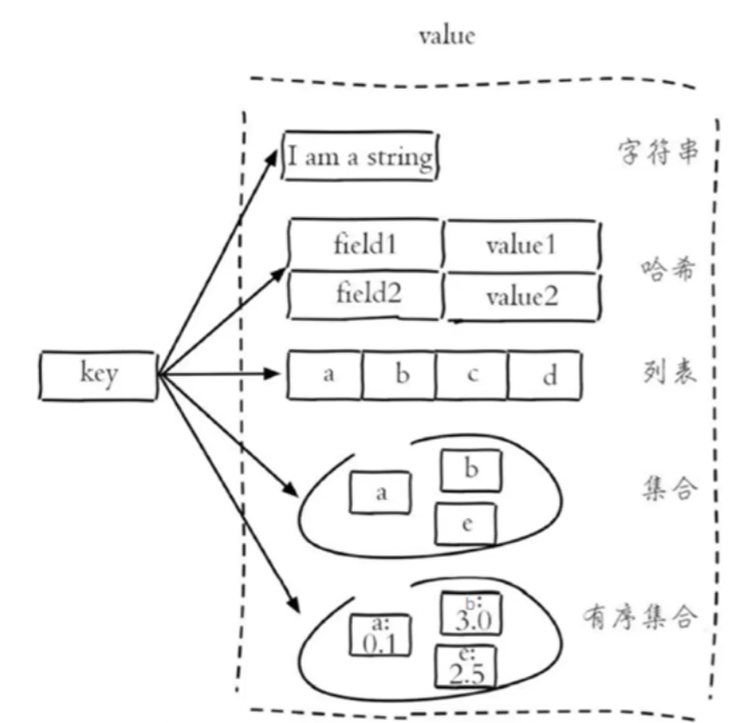
2. Redis数据类型 2.1 五种常用数据类型介绍 Redis存储的是key-value结构的数据,其中key是字符串类型,value有5种常用的数据类型:
字符串 string
哈希 hash
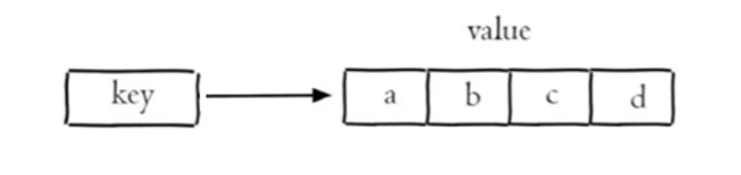
列表 list
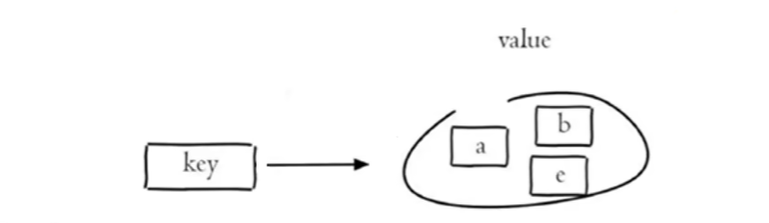
集合 set
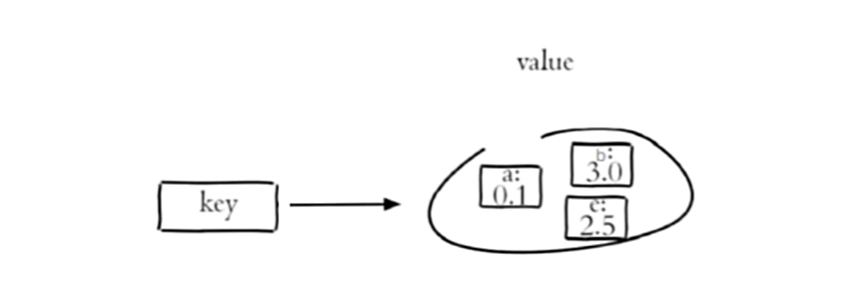
有序集合 sorted set / zset
2.2 各种数据类型特点
解释说明:
字符串(string):普通字符串,Redis中最简单的数据类型
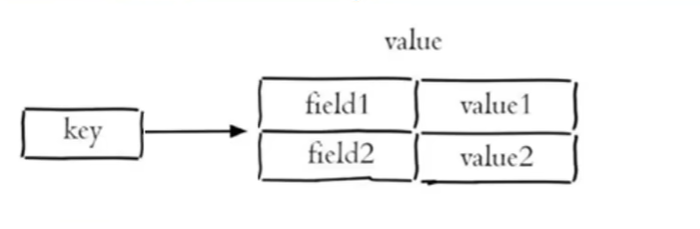
哈希(hash):也叫散列,类似于Java中的HashMap结构
列表(list):按照插入顺序排序,可以有重复元素,类似于Java中的LinkedList
集合(set):无序集合,没有重复元素,类似于Java中的HashSet
有序集合(sorted set/zset):集合中每个元素关联一个分数(score),根据分数升序排序,没有重复元素
3. Redis常用命令 3.1 字符串操作命令 Redis 中字符串类型常用命令:
SET key value 设置指定key的值GET key 获取指定key的值SETEX key seconds value 设置指定key的值,并将 key 的过期时间设为 seconds 秒SETNX key value 只有在 key 不存在时设置 key 的值
3.2 哈希操作命令 Redis hash 是一个string类型的 field 和 value 的映射表,hash特别适合用于存储对象,常用命令:
HSET key field value 将哈希表 key 中的字段 field 的值设为 valueHGET key field 获取存储在哈希表中指定字段的值HDEL key field 删除存储在哈希表中的指定字段HKEYS key 获取哈希表中所有字段HVALS key 获取哈希表中所有值
3.3 列表操作命令 Redis 列表是简单的字符串列表,按照插入顺序排序,常用命令:
LPUSH key value1 [value2] 将一个或多个值插入到列表头部LRANGE key start stop 获取列表指定范围内的元素RPOP key 移除并获取列表最后一个元素LLEN key 获取列表长度BRPOP key1 [key2 ] timeout 移出并获取列表的最后一个元素, 如果列表没有元素会阻塞列表直到等待超 时或发现可弹出元素为止
3.4 集合操作命令 Redis set 是string类型的无序集合。集合成员是唯一的,这就意味着集合中不能出现重复的数据,常用命令:
SADD key member1 [member2] 向集合添加一个或多个成员SMEMBERS key 返回集合中的所有成员SCARD key 获取集合的成员数SINTER key1 [key2] 返回给定所有集合的交集SUNION key1 [key2] 返回所有给定集合的并集SREM key member1 [member2] 移除集合中一个或多个成员
3.5 有序集合操作命令 Redis有序集合是string类型元素的集合,且不允许有重复成员。每个元素都会关联一个double类型的分数。常用命令:
常用命令:
ZADD key score1 member1 [score2 member2] 向有序集合添加一个或多个成员ZRANGE key start stop [WITHSCORES] 通过索引区间返回有序集合中指定区间内的成员ZINCRBY key increment member 有序集合中对指定成员的分数加上增量 incrementZREM key member [member …] 移除有序集合中的一个或多个成员
3.6 通用命令 Redis的通用命令是不分数据类型的,都可以使用的命令:
KEYS pattern 查找所有符合给定模式( pattern)的 key
EXISTS key 检查给定 key 是否存在
TYPE key 返回 key 所储存的值的类型
DEL key 该命令用于在 key 存在是删除 key
4. 在java中操作Redis 4.1 Spring Data Redis Spring 对 Redis 客户端进行了整合,提供了 Spring Data Redis,我们重点学习Spring Data Redis 。
Spring Data Redis中提供了一个高度封装的类:RedisTemplate ,对相关api进行了归类封装,将同一类型操作封装为operation接口,具体分类如下:
ValueOperations:string数据操作
SetOperations:set类型数据操作
ZSetOperations:zset类型数据操作
HashOperations:hash类型的数据操作
ListOperations:list类型的数据操作
4.2 通过RedisTemplate对象操作Redis 在test下新建测试类
1 2 3 4 5 6 7 8 9 10 11 12 13 14 15 16 17 18 19 20 21 22 23 24 25 26 27 package com.sky.test;import org.junit.jupiter.api.Test;import org.springframework.beans.factory.annotation.Autowired;import org.springframework.boot.test.context.SpringBootTest;import org.springframework.data.redis.core.*;@SpringBootTest public class SpringDataRedisTest {@Autowired private RedisTemplate redisTemplate;@Test public void testRedisTemplate () {ValueOperations valueOperations = redisTemplate.opsForValue();HashOperations hashOperations = redisTemplate.opsForHash();ListOperations listOperations = redisTemplate.opsForList();SetOperations setOperations = redisTemplate.opsForSet();ZSetOperations zSetOperations = redisTemplate.opsForZSet();
4.3 操作常见类型数据 1). 操作字符串类型数据
1 2 3 4 5 6 7 8 9 10 11 12 13 @Test public void testString () {"name" ,"小明" );String city = (String) redisTemplate.opsForValue().get("name" );"code" ,"1234" ,3 , TimeUnit.MINUTES);"lock" ,"1" );"lock" ,"2" );
2). 操作哈希类型数据
1 2 3 4 5 6 7 8 9 10 11 12 13 14 15 16 17 18 19 20 21 22 @Test public void testHash () {HashOperations hashOperations = redisTemplate.opsForHash();"100" ,"name" ,"tom" );"100" ,"age" ,"20" );String name = (String) hashOperations.get("100" , "name" );Set keys = hashOperations.keys("100" );List values = hashOperations.values("100" );"100" ,"age" );
3). 操作列表类型数据
1 2 3 4 5 6 7 8 9 10 11 12 13 14 15 16 17 18 19 @Test public void testList () {ListOperations listOperations = redisTemplate.opsForList();"mylist" ,"a" ,"b" ,"c" );"mylist" ,"d" );List mylist = listOperations.range("mylist" , 0 , -1 );"mylist" );Long size = listOperations.size("mylist" );
4). 操作集合类型数据
1 2 3 4 5 6 7 8 9 10 11 12 13 14 15 16 17 18 19 20 21 22 23 24 25 @Test public void testSet () {SetOperations setOperations = redisTemplate.opsForSet();"set1" ,"a" ,"b" ,"c" ,"d" );"set2" ,"a" ,"b" ,"x" ,"y" );Set members = setOperations.members("set1" );Long size = setOperations.size("set1" );Set intersect = setOperations.intersect("set1" , "set2" );Set union = setOperations.union("set1" , "set2" );"set1" ,"a" ,"b" );
5). 操作有序集合类型数据
1 2 3 4 5 6 7 8 9 10 11 12 13 14 15 16 17 18 19 @Test public void testZset () {ZSetOperations zSetOperations = redisTemplate.opsForZSet();"zset1" ,"a" ,10 );"zset1" ,"b" ,12 );"zset1" ,"c" ,9 );Set zset1 = zSetOperations.range("zset1" , 0 , -1 );"zset1" ,"c" ,10 );"zset1" ,"a" ,"b" );
6). 通用命令操作
1 2 3 4 5 6 7 8 9 10 11 12 13 14 15 16 17 18 19 @Test public void testCommon () {Set keys = redisTemplate.keys("*" );Boolean name = redisTemplate.hasKey("name" );Boolean set1 = redisTemplate.hasKey("set1" );for (Object key : keys) {DataType type = redisTemplate.type(key);"mylist" );
六. 店铺营业状态 营业状态分为营业中 和打烊中
1. 设置营业状态 在sky-server模块中,创建ShopController.java
根据接口定义创建ShopController的setStatus设置营业状态方法:
1 2 3 4 5 6 7 8 9 10 11 12 13 14 15 16 17 18 19 20 21 22 23 24 25 26 27 28 29 30 31 32 33 34 35 36 37 package com.sky.controller.admin;import com.sky.result.Result;import io.swagger.annotations.Api;import io.swagger.annotations.ApiOperation;import lombok.extern.slf4j.Slf4j;import org.springframework.beans.factory.annotation.Autowired;import org.springframework.data.redis.core.RedisTemplate;import org.springframework.web.bind.annotation.PathVariable;import org.springframework.web.bind.annotation.PutMapping;import org.springframework.web.bind.annotation.RequestMapping;import org.springframework.web.bind.annotation.RestController;@RestController("adminShopController") @RequestMapping("/admin/shop") @Api(tags = "店铺相关接口") @Slf4j public class ShopController {public static final String KEY = "SHOP_STATUS" ;@Autowired private RedisTemplate redisTemplate;@PutMapping("/{status}") @ApiOperation("设置店铺的营业状态") public Result setStatus (@PathVariable Integer status) {"设置店铺的营业状态为:{}" ,status == 1 ? "营业中" : "打烊中" );return Result.success();
2. 管理端查询营业状态 根据接口定义创建ShopController的getStatus查询营业状态方法:
1 2 3 4 5 6 7 8 9 10 11 @GetMapping("/status") @ApiOperation("获取店铺的营业状态") public Result<Integer> getStatus () {Integer status = (Integer) redisTemplate.opsForValue().get(KEY);"获取到店铺的营业状态为:{}" ,status == 1 ? "营业中" : "打烊中" );return Result.success(status);
3. 用户端查询营业状态 创建com.sky.controller.user包,在该包下创建ShopController.java
根据接口定义创建ShopController的getStatus查询营业状态方法:
1 2 3 4 5 6 7 8 9 10 11 12 13 14 15 16 17 18 19 20 21 22 23 24 25 26 27 28 29 30 31 32 33 package com.sky.controller.user;import com.sky.result.Result;import io.swagger.annotations.Api;import io.swagger.annotations.ApiOperation;import lombok.extern.slf4j.Slf4j;import org.springframework.beans.factory.annotation.Autowired;import org.springframework.data.redis.core.RedisTemplate;import org.springframework.web.bind.annotation.*;@RestController("userShopController") @RequestMapping("/user/shop") @Api(tags = "店铺相关接口") @Slf4j public class ShopController {public static final String KEY = "SHOP_STATUS" ;@Autowired private RedisTemplate redisTemplate;@GetMapping("/status") @ApiOperation("获取店铺的营业状态") public Result<Integer> getStatus () {Integer status = (Integer) redisTemplate.opsForValue().get(KEY);"获取到店铺的营业状态为:{}" ,status == 1 ? "营业中" : "打烊中" );return Result.success(status);
七. HttpClient HttpClient 是Apache Jakarta Common 下的子项目,可以用来提供高效的、最新的、功能丰富的支持 HTTP 协议的客户端编程工具包,并且它支持 HTTP 协议最新的版本和建议。
HttpClient作用:
HttpClient的核心API:
HttpClient:Http客户端对象类型,使用该类型对象可发起Http请求。
HttpClients:可认为是构建器,可创建HttpClient对象。
CloseableHttpClient:实现类,实现了HttpClient接口。
HttpGet:Get方式请求类型。
HttpPost:Post方式请求类型。
HttpClient发送请求步骤:
创建HttpClient对象
创建Http请求对象
调用HttpClient的execute方法发送请求
八. 微信登录 1. 定义相关配置 1.1 配置微信登录所需配置项 application-dev.yml
1 2 3 4 sky: wechat: appid: wxffb3637a228223b8 secret: 84311df9199ecacdf4f12d27b6b9522d
application.yml
1 2 3 4 sky: wechat: appid: ${sky.wechat.appid} secret: ${sky.wechat.secret}
1.2 配置为微信用户生成jwt令牌时使用的配置项 application.yml
1 2 3 4 5 6 7 8 9 10 11 sky: jwt: admin-secret-key: itcast admin-ttl: 7200000 admin-token-name: token user-secret-key: itheima user-ttl: 7200000 user-token-name: authentication
2. DTO设计 根据传入参数设计DTO类:
在sky-pojo模块,UserLoginDTO.java已定义
1 2 3 4 5 6 7 8 9 10 11 12 13 14 15 package com.sky.dto;import lombok.Data;import java.io.Serializable;@Data public class UserLoginDTO implements Serializable {private String code;
3. VO设计 根据返回数据设计VO类:
在sky-pojo模块,UserLoginVO.java已定义
1 2 3 4 5 6 7 8 9 10 11 12 13 14 15 16 17 18 19 20 package com.sky.vo;import lombok.AllArgsConstructor;import lombok.Builder;import lombok.Data;import lombok.NoArgsConstructor;import java.io.Serializable;@Data @Builder @NoArgsConstructor @AllArgsConstructor public class UserLoginVO implements Serializable {private Long id;private String openid;private String token;
4. Controller层 根据接口定义创建UserController的login方法:
1 2 3 4 5 6 7 8 9 10 11 12 13 14 15 16 17 18 19 20 21 22 23 24 25 26 27 28 29 30 31 32 33 34 35 36 37 38 39 40 41 42 43 44 45 46 47 48 49 50 51 52 53 54 55 56 57 58 package com.sky.controller.user;import com.sky.constant.JwtClaimsConstant;import com.sky.dto.UserLoginDTO;import com.sky.entity.User;import com.sky.properties.JwtProperties;import com.sky.result.Result;import com.sky.service.UserService;import com.sky.utils.JwtUtil;import com.sky.vo.UserLoginVO;import io.swagger.annotations.Api;import io.swagger.annotations.ApiOperation;import lombok.extern.slf4j.Slf4j;import org.springframework.beans.factory.annotation.Autowired;import org.springframework.web.bind.annotation.PostMapping;import org.springframework.web.bind.annotation.RequestBody;import org.springframework.web.bind.annotation.RequestMapping;import org.springframework.web.bind.annotation.RestController;import java.util.HashMap;import java.util.Map;@RestController @RequestMapping("/user/user") @Api(tags = "C端用户相关接口") @Slf4j public class UserController {@Autowired private UserService userService;@Autowired private JwtProperties jwtProperties;@PostMapping("/login") @ApiOperation("微信登录") public Result<UserLoginVO> login (@RequestBody UserLoginDTO userLoginDTO) {"微信用户登录:{}" ,userLoginDTO.getCode());User user = userService.wxLogin(userLoginDTO);new HashMap <>();String token = JwtUtil.createJWT(jwtProperties.getUserSecretKey(), jwtProperties.getUserTtl(), claims);UserLoginVO userLoginVO = UserLoginVO.builder()return Result.success(userLoginVO);
5. Service层 5.1 Service层接口 创建UserService接口:
1 2 3 4 5 6 7 8 9 10 11 12 13 14 package com.sky.service;import com.sky.dto.UserLoginDTO;import com.sky.entity.User;public interface UserService {wxLogin (UserLoginDTO userLoginDTO) ;
5.2 Service层实现类 **创建UserServiceImpl实现类:**实现获取微信用户的openid和微信登录功能
1 2 3 4 5 6 7 8 9 10 11 12 13 14 15 16 17 18 19 20 21 22 23 24 25 26 27 28 29 30 31 32 33 34 35 36 37 38 39 40 41 42 43 44 45 46 47 48 49 50 51 52 53 54 55 56 57 58 59 60 61 62 63 64 65 66 67 68 69 70 71 72 73 74 75 76 77 78 79 80 package com.sky.service.impl;import com.alibaba.fastjson.JSON;import com.alibaba.fastjson.JSONObject;import com.sky.constant.MessageConstant;import com.sky.dto.UserLoginDTO;import com.sky.entity.User;import com.sky.exception.LoginFailedException;import com.sky.mapper.UserMapper;import com.sky.properties.WeChatProperties;import com.sky.service.UserService;import com.sky.utils.HttpClientUtil;import lombok.extern.slf4j.Slf4j;import org.springframework.beans.factory.annotation.Autowired;import org.springframework.stereotype.Service;import java.time.LocalDateTime;import java.util.HashMap;import java.util.Map;@Service @Slf4j public class UserServiceImpl implements UserService {public static final String WX_LOGIN = "https://api.weixin.qq.com/sns/jscode2session" ;@Autowired private WeChatProperties weChatProperties;@Autowired private UserMapper userMapper;public User wxLogin (UserLoginDTO userLoginDTO) {String openid = getOpenid(userLoginDTO.getCode());if (openid == null ){throw new LoginFailedException (MessageConstant.LOGIN_FAILED);User user = userMapper.getByOpenid(openid);if (user == null ){return user;private String getOpenid (String code) {new HashMap <>();"appid" ,weChatProperties.getAppid());"secret" ,weChatProperties.getSecret());"js_code" ,code);"grant_type" ,"authorization_code" );String json = HttpClientUtil.doGet(WX_LOGIN, map);JSONObject jsonObject = JSON.parseObject(json);String openid = jsonObject.getString("openid" );return openid;
6. Mapper层 创建UserMapper接口:
1 2 3 4 5 6 7 8 9 10 11 12 13 14 15 16 17 18 19 20 21 22 23 package com.sky.mapper;import com.sky.entity.User;import org.apache.ibatis.annotations.Mapper;import org.apache.ibatis.annotations.Select;@Mapper public interface UserMapper {@Select("select * from user where openid = #{openid}") getByOpenid (String openid) ;void insert (User user) ;
创建UserMapper.xml映射文件:
1 2 3 4 5 6 7 8 9 10 11 <?xml version="1.0" encoding="UTF-8" ?> <!DOCTYPE mapper PUBLIC "-//mybatis.org//DTD Mapper 3.0//EN" "http://mybatis.org/dtd/mybatis-3-mapper.dtd" > <mapper namespace ="com.sky.mapper.UserMapper" > <insert id ="insert" useGeneratedKeys ="true" keyProperty ="id" > </insert > </mapper >
7. 编写拦截器 **编写拦截器JwtTokenUserInterceptor:**统一拦截用户端发送的请求并进行jwt校验
1 2 3 4 5 6 7 8 9 10 11 12 13 14 15 16 17 18 19 20 21 22 23 24 25 26 27 28 29 30 31 32 33 34 35 36 37 38 39 40 41 42 43 44 45 46 47 48 49 50 51 52 53 54 55 56 57 58 59 60 61 package com.sky.interceptor;import com.sky.constant.JwtClaimsConstant;import com.sky.context.BaseContext;import com.sky.properties.JwtProperties;import com.sky.utils.JwtUtil;import io.jsonwebtoken.Claims;import lombok.extern.slf4j.Slf4j;import org.springframework.beans.factory.annotation.Autowired;import org.springframework.stereotype.Component;import org.springframework.web.method.HandlerMethod;import org.springframework.web.servlet.HandlerInterceptor;import javax.servlet.http.HttpServletRequest;import javax.servlet.http.HttpServletResponse;@Component @Slf4j public class JwtTokenUserInterceptor implements HandlerInterceptor {@Autowired private JwtProperties jwtProperties;public boolean preHandle (HttpServletRequest request, HttpServletResponse response, Object handler) throws Exception {if (!(handler instanceof HandlerMethod)) {return true ;String token = request.getHeader(jwtProperties.getUserTokenName());try {"jwt校验:{}" , token);Claims claims = JwtUtil.parseJWT(jwtProperties.getUserSecretKey(), token);Long userId = Long.valueOf(claims.get(JwtClaimsConstant.USER_ID).toString());"当前用户的id:" , userId);return true ;catch (Exception ex) {401 );return false ;
在WebMvcConfiguration配置类中注册拦截器:
1 2 3 4 5 6 7 8 9 10 11 12 13 14 15 @Autowired private JwtTokenUserInterceptor jwtTokenUserInterceptor;protected void addInterceptors (InterceptorRegistry registry) {"开始注册自定义拦截器..." );"/user/**" )"/user/user/login" )"/user/shop/status" );
九. 商品浏览功能 这里导入相关代码
1. Mapper层 在SetmealMapper.java中添加list和getDishItemBySetmealId两个方法
1 2 3 4 5 6 7 8 9 10 11 12 13 14 15 16 list (Setmeal setmeal) ;@Select("select sd.name, sd.copies, d.image, d.description " + "from setmeal_dish sd left join dish d on sd.dish_id = d.id " + "where sd.setmeal_id = #{setmealId}") getDishItemBySetmealId (Long setmealId) ;
创建SetmealMapper.xml文件
1 2 3 4 5 6 7 8 9 10 11 12 13 14 15 16 17 18 19 20 <?xml version="1.0" encoding="UTF-8" ?> <!DOCTYPE mapper PUBLIC "-//mybatis.org//DTD Mapper 3.0//EN" "http://mybatis.org/dtd/mybatis-3-mapper.dtd" > <mapper namespace ="com.sky.mapper.SetmealMapper" > <select id ="list" parameterType ="Setmeal" resultType ="Setmeal" > <where > <if test ="name != null" > </if > <if test ="categoryId != null" > </if > <if test ="status != null" > </if > </where > </select > </mapper >
2. Service层 创建SetmealService.java
1 2 3 4 5 6 7 8 9 10 11 12 13 14 15 16 17 18 19 20 21 22 23 24 25 26 27 package com.sky.service;import com.sky.dto.SetmealDTO;import com.sky.dto.SetmealPageQueryDTO;import com.sky.entity.Setmeal;import com.sky.result.PageResult;import com.sky.vo.DishItemVO;import com.sky.vo.SetmealVO;import java.util.List;public interface SetmealService {list (Setmeal setmeal) ;getDishItemById (Long id) ;
创建SetmealServiceImpl.java
1 2 3 4 5 6 7 8 9 10 11 12 13 14 15 16 17 18 19 20 21 22 23 24 25 26 27 28 29 30 31 32 33 34 35 36 37 38 39 40 41 42 43 44 45 46 47 package com.sky.service.impl;import com.sky.entity.Setmeal;import com.sky.mapper.DishMapper;import com.sky.mapper.SetmealDishMapper;import com.sky.mapper.SetmealMapper;import com.sky.service.SetmealService;import com.sky.vo.DishItemVO;import lombok.extern.slf4j.Slf4j;import org.springframework.beans.factory.annotation.Autowired;import org.springframework.stereotype.Service;import java.util.List;@Service @Slf4j public class SetmealServiceImpl implements SetmealService {@Autowired private SetmealMapper setmealMapper;@Autowired private SetmealDishMapper setmealDishMapper;@Autowired private DishMapper dishMapper;public List<Setmeal> list (Setmeal setmeal) {return list;public List<DishItemVO> getDishItemById (Long id) {return setmealMapper.getDishItemBySetmealId(id);
在DishService.java中添加listWithFlavor方法定义
1 2 3 4 5 6 listWithFlavor (Dish dish) ;
在DishServiceImpl.java中实现listWithFlavor方法
1 2 3 4 5 6 7 8 9 10 11 12 13 14 15 16 17 18 19 20 21 22 23 public List<DishVO> listWithFlavor (Dish dish) {new ArrayList <>();for (Dish d : dishList) {DishVO dishVO = new DishVO ();return dishVOList;
3. Controller层 创建DishController.java
1 2 3 4 5 6 7 8 9 10 11 12 13 14 15 16 17 18 19 20 21 22 23 24 25 26 27 28 29 30 31 32 33 34 35 36 37 38 39 40 41 42 43 package com.sky.controller.user;import com.sky.constant.StatusConstant;import com.sky.entity.Dish;import com.sky.result.Result;import com.sky.service.DishService;import com.sky.vo.DishVO;import io.swagger.annotations.Api;import io.swagger.annotations.ApiOperation;import lombok.extern.slf4j.Slf4j;import org.springframework.beans.factory.annotation.Autowired;import org.springframework.web.bind.annotation.GetMapping;import org.springframework.web.bind.annotation.RequestMapping;import org.springframework.web.bind.annotation.RestController;import java.util.List;@RestController("userDishController") @RequestMapping("/user/dish") @Slf4j @Api(tags = "C端-菜品浏览接口") public class DishController {@Autowired private DishService dishService;@GetMapping("/list") @ApiOperation("根据分类id查询菜品") public Result<List<DishVO>> list (Long categoryId) {Dish dish = new Dish ();return Result.success(list);
创建CategoryController.java
1 2 3 4 5 6 7 8 9 10 11 12 13 14 15 16 17 18 19 20 21 22 23 24 25 26 27 28 29 30 31 32 33 package com.sky.controller.user;import com.sky.entity.Category;import com.sky.result.Result;import com.sky.service.CategoryService;import io.swagger.annotations.Api;import io.swagger.annotations.ApiOperation;import org.springframework.beans.factory.annotation.Autowired;import org.springframework.web.bind.annotation.GetMapping;import org.springframework.web.bind.annotation.RequestMapping;import org.springframework.web.bind.annotation.RestController;import java.util.List;@RestController("userCategoryController") @RequestMapping("/user/category") @Api(tags = "C端-分类接口") public class CategoryController {@Autowired private CategoryService categoryService;@GetMapping("/list") @ApiOperation("查询分类") public Result<List<Category>> list (Integer type) {return Result.success(list);
创建SetmealController.java
1 2 3 4 5 6 7 8 9 10 11 12 13 14 15 16 17 18 19 20 21 22 23 24 25 26 27 28 29 30 31 32 33 34 35 36 37 38 39 40 41 42 43 44 45 46 47 48 49 50 51 52 53 package com.sky.controller.user;import com.sky.constant.StatusConstant;import com.sky.entity.Setmeal;import com.sky.result.Result;import com.sky.service.SetmealService;import com.sky.vo.DishItemVO;import io.swagger.annotations.Api;import io.swagger.annotations.ApiOperation;import org.springframework.beans.factory.annotation.Autowired;import org.springframework.web.bind.annotation.GetMapping;import org.springframework.web.bind.annotation.PathVariable;import org.springframework.web.bind.annotation.RequestMapping;import org.springframework.web.bind.annotation.RestController;import java.util.List;@RestController("userSetmealController") @RequestMapping("/user/setmeal") @Api(tags = "C端-套餐浏览接口") public class SetmealController {@Autowired private SetmealService setmealService;@GetMapping("/list") @ApiOperation("根据分类id查询套餐") public Result<List<Setmeal>> list (Long categoryId) {Setmeal setmeal = new Setmeal ();return Result.success(list);@GetMapping("/dish/{id}") @ApiOperation("根据套餐id查询包含的菜品列表") public Result<List<DishItemVO>> dishList (@PathVariable("id") Long id) {return Result.success(list);
十. 缓存菜品和套餐 1. 缓存菜品 1.1 问题分析 用户端小程序展示的菜品数据都是通过查询数据库获得,如果用户端访问量比较大,数据库访问压力随之增大。通过Redis来缓存菜品数据,减少数据库查询操作 。
每个分类下的菜品保存一份缓存数据
数据库中菜品数据有变更时清理缓存数据
为了保证数据库和Redis中的数据保持一致 ,修改管理端接口 DishController 的相关方法,加入清理缓存逻辑。
需要改造的方法:
1.2 用户端接口DishController 修改用户端接口 DishController 的 list 方法,加入缓存处理逻辑:
1 2 3 4 5 6 7 8 9 10 11 12 13 14 15 16 17 18 19 20 21 22 23 24 25 26 27 28 29 30 31 32 33 @Autowired private RedisTemplate redisTemplate;@GetMapping("/list") @ApiOperation("根据分类id查询菜品") public Result<List<DishVO>> list (Long categoryId) {String key = "dish_" + categoryId;if (list != null && list.size() > 0 ){return Result.success(list);Dish dish = new Dish ();return Result.success(list);
1.3 管理端接口DishController 1.3.1 抽取清理缓存的方法 在管理端DishController中添加
1 2 3 4 5 6 7 8 9 10 @Autowired private RedisTemplate redisTemplate;private void cleanCache (String pattern) {Set keys = redisTemplate.keys(pattern);
1.3.2 新增菜品优化 1 2 3 4 5 6 7 8 9 10 11 12 13 14 15 16 17 @PostMapping @ApiOperation("新增菜品") public Result save (@RequestBody DishDTO dishDTO) {"新增菜品:{}" , dishDTO);String key = "dish_" + dishDTO.getCategoryId();return Result.success();
1.3.3 菜品批量删除优化 1 2 3 4 5 6 7 8 9 10 11 12 13 14 15 16 17 @DeleteMapping @ApiOperation("菜品批量删除") public Result delete (@RequestParam List<Long> ids) {"菜品批量删除:{}" , ids);"dish_*" );return Result.success();
1.3.4 修改菜品优化 1 2 3 4 5 6 7 8 9 10 11 12 13 14 15 16 17 @PutMapping @ApiOperation("修改菜品") public Result update (@RequestBody DishDTO dishDTO) {"修改菜品:{}" , dishDTO);"dish_*" );return Result.success();
1.3.5 菜品起售停售优化 1 2 3 4 5 6 7 8 9 10 11 12 13 14 15 16 17 @PostMapping("/status/{status}") @ApiOperation("菜品起售停售") public Result<String> startOrStop (@PathVariable Integer status, Long id) {"dish_*" );return Result.success();
2. 缓存套餐 2.1 Spring Cache Spring Cache 是一个框架,实现了基于注解的缓存功能,只需要简单地加一个注解,就能实现缓存功能。
2.1.1 常用注解 在SpringCache中提供了很多缓存操作的注解,常见的是以下的几个:
注解 说明
@EnableCaching
开启缓存注解功能,通常加在启动类上
@Cacheable
在方法执行前先查询缓存中是否有数据,如果有数据,则直接返回缓存数据;如果没有缓存数据,调用方法并将方法返回值放到缓存中
@CachePut
将方法的返回值放到缓存中
@CacheEvict
将一条或多条数据从缓存中删除
2.1.2 @EnableCaching 启动类上加@EnableCaching:
1 2 3 4 5 6 7 8 9 10 11 12 13 14 15 16 package com.itheima;import lombok.extern.slf4j.Slf4j;import org.springframework.boot.SpringApplication;import org.springframework.boot.autoconfigure.SpringBootApplication;import org.springframework.cache.annotation.EnableCaching;@Slf4j @SpringBootApplication @EnableCaching public class CacheDemoApplication {public static void main (String[] args) {"项目启动成功..." );
2.1.3 @CachePut注解 @CachePut 说明:
作用: 将方法返回值,放入缓存
value: 缓存的名称, 每个缓存名称下面可以有很多key
key: 缓存的key ———-> 支持Spring的表达式语言SPEL语法
在save方法上加注解@CachePut
当前UserController的save方法是用来保存用户信息的,我们希望在该用户信息保存到数据库的同时,也往缓存中缓存一份数据,我们可以在save方法上加上注解 @CachePut,用法如下:
1 2 3 4 5 6 7 8 9 10 11 @PostMapping @CachePut(value = "userCache", key = "#user.id") public User save (@RequestBody User user) {return user;
**说明:**key的写法如下
#user.id : #user指的是方法形参的名称, id指的是user的id属性 , 也就是使用user的id属性作为key ;
2.1.4 @Cacheable注解 @Cacheable 说明:
作用: 在方法执行前,spring先查看缓存中是否有数据,如果有数据,则直接返回缓存数据;若没有数据,调用方法并将方法返回值放到缓存中
value: 缓存的名称,每个缓存名称下面可以有多个key
key: 缓存的key ———-> 支持Spring的表达式语言SPEL语法
在getById上加注解@Cacheable
1 2 3 4 5 6 7 8 9 10 11 @GetMapping @Cacheable(cacheNames = "userCache",key="#id") public User getById (Long id) {User user = userMapper.getById(id);return user;
2.1.5 @CacheEvict注解 @CacheEvict 说明:
作用: 清理指定缓存
value: 缓存的名称,每个缓存名称下面可以有多个key
key: 缓存的key ———-> 支持Spring的表达式语言SPEL语法
在 delete 方法上加注解@CacheEvict
1 2 3 4 5 6 7 8 9 10 11 @DeleteMapping @CacheEvict(cacheNames = "userCache",key = "#id") public void deleteById (Long id) {@DeleteMapping("/delAll") @CacheEvict(cacheNames = "userCache",allEntries = true) public void deleteAll () {
2.2 实现思路 实现步骤:
1). 导入Spring Cache和Redis相关maven坐标
2). 在启动类上加入@EnableCaching注解,开启缓存注解功能
3). 在用户端接口SetmealController的 list 方法上加入@Cacheable注解
4). 在管理端接口SetmealController的 save、delete、update、startOrStop等方法上加入CacheEvict注解
2.3 代码开发 2.3.1 @EnableCaching 在启动类上加入@EnableCaching注解,开启缓存注解功能
1 2 3 4 5 6 7 8 9 10 11 12 13 14 15 16 17 18 package com.sky;import lombok.extern.slf4j.Slf4j;import org.springframework.boot.SpringApplication;import org.springframework.boot.autoconfigure.SpringBootApplication;import org.springframework.cache.annotation.EnableCaching;import org.springframework.transaction.annotation.EnableTransactionManagement;@SpringBootApplication @EnableTransactionManagement @Slf4j @EnableCaching public class SkyApplication {public static void main (String[] args) {"server started" );
2.3.2 用户端接口 在用户端接口SetmealController的 list 方法上加入@Cacheable注解
1 2 3 4 5 6 7 8 9 10 11 12 13 14 15 16 17 @GetMapping("/list") @ApiOperation("根据分类id查询套餐") @Cacheable(cacheNames = "setmealCache",key = "#categoryId") public Result<List<Setmeal>> list (Long categoryId) {Setmeal setmeal = new Setmeal ();return Result.success(list);
2.3.3 管理端接口 在管理端接口SetmealController的 save、delete、update、startOrStop等方法上加入CacheEvict注解
1 2 3 4 5 6 7 8 9 10 11 12 13 14 15 16 17 18 19 20 21 22 23 24 25 26 27 28 29 30 31 32 33 34 35 36 37 38 39 40 41 42 43 44 45 46 47 48 49 50 51 52 53 54 @PostMapping @ApiOperation("新增套餐") @CacheEvict(cacheNames = "setmealCache",key = "#setmealDTO.categoryId") public Result save (@RequestBody SetmealDTO setmealDTO) {return Result.success();@DeleteMapping @ApiOperation("批量删除套餐") @CacheEvict(cacheNames = "setmealCache",allEntries = true) public Result delete (@RequestParam List<Long> ids) {return Result.success();@PutMapping @ApiOperation("修改套餐") @CacheEvict(cacheNames = "setmealCache",allEntries = true) public Result update (@RequestBody SetmealDTO setmealDTO) {return Result.success();@PostMapping("/status/{status}") @ApiOperation("套餐起售停售") @CacheEvict(cacheNames = "setmealCache",allEntries = true) public Result startOrStop (@PathVariable Integer status, Long id) {return Result.success();
十一. 购物车管理 1. 添加购物车 1.1 Controller层 根据添加购物车接口创建ShoppingCartController:
1 2 3 4 5 6 7 8 9 10 11 12 13 14 15 16 17 18 19 20 21 22 23 24 25 26 27 28 29 30 31 32 33 34 35 36 37 38 39 package com.sky.controller.user;import com.sky.dto.ShoppingCartDTO;import com.sky.result.Result;import io.swagger.annotations.Api;import io.swagger.annotations.ApiOperation;import lombok.extern.slf4j.Slf4j;import org.springframework.beans.factory.annotation.Autowired;import org.springframework.web.bind.annotation.PostMapping;import org.springframework.web.bind.annotation.RequestBody;import org.springframework.web.bind.annotation.RequestMapping;import org.springframework.web.bind.annotation.RestController;@RestController @RequestMapping("/user/shoppingCart") @Slf4j @Api(tags = "C端-购物车接口") public class ShoppingCartController {@Autowired private ShoppingCartService shoppingCartService;@PostMapping("/add") @ApiOperation("添加购物车") public Result<String> add (@RequestBody ShoppingCartDTO shoppingCartDTO) {"添加购物车:{}" , shoppingCartDTO);return Result.success();
1.2 Service层 1.2.1 Service层接口 创建ShoppingCartService接口:
1 2 3 4 5 6 7 8 9 10 11 12 13 14 package com.sky.service;import com.sky.dto.ShoppingCartDTO;import com.sky.entity.ShoppingCart;import java.util.List;public interface ShoppingCartService {void addShoppingCart (ShoppingCartDTO shoppingCartDTO) ;
1.2.2 Service层实现类 创建ShoppingCartServiceImpl实现类,并实现add方法:
1 2 3 4 5 6 7 8 9 10 11 12 13 14 15 16 17 18 19 20 21 22 23 24 25 26 27 28 29 30 31 32 33 34 35 36 37 38 39 40 41 42 43 44 45 46 47 48 49 50 51 52 53 54 55 56 57 58 59 60 61 62 63 64 65 66 67 68 69 70 package com.sky.service.impl;import com.sky.context.BaseContext;import com.sky.dto.ShoppingCartDTO;import com.sky.entity.Dish;import com.sky.entity.Setmeal;import com.sky.entity.ShoppingCart;import com.sky.mapper.DishMapper;import com.sky.mapper.SetmealMapper;import com.sky.service.ShoppingCartService;import org.springframework.beans.BeanUtils;import org.springframework.beans.factory.annotation.Autowired;import org.springframework.stereotype.Service;import java.time.LocalDateTime;import java.util.List;@Service public class ShoppingCartServiceImpl implements ShoppingCartService {@Autowired private ShoppingCartMapper shoppingCartMapper;@Autowired private DishMapper dishMapper;@Autowired private SetmealMapper setmealMapper;public void addShoppingCart (ShoppingCartDTO shoppingCartDTO) {ShoppingCart shoppingCart = new ShoppingCart ();if (shoppingCartList != null && shoppingCartList.size() == 1 ) {0 );1 );else {Long dishId = shoppingCartDTO.getDishId();if (dishId != null ) {Dish dish = dishMapper.getById(dishId);else {Setmeal setmeal = setmealMapper.getById(shoppingCartDTO.getSetmealId());1 );
1.3 Mapper层 创建ShoppingCartMapper接口:
1 2 3 4 5 6 7 8 9 10 11 12 13 14 15 16 17 18 19 20 21 22 23 24 25 26 27 28 29 30 31 32 33 34 35 36 37 package com.sky.mapper;import com.sky.entity.ShoppingCart;import org.apache.ibatis.annotations.Delete;import org.apache.ibatis.annotations.Insert;import org.apache.ibatis.annotations.Mapper;import org.apache.ibatis.annotations.Update;import java.util.List;@Mapper public interface ShoppingCartMapper {list (ShoppingCart shoppingCart) ;@Update("update shopping_cart set number = #{number} where id = #{id}") void updateNumberById (ShoppingCart shoppingCart) ;@Insert("insert into shopping_cart (name, user_id, dish_id, setmeal_id, dish_flavor, number, amount, image, create_time) " + " values (#{name},#{userId},#{dishId},#{setmealId},#{dishFlavor},#{number},#{amount},#{image},#{createTime})") void insert (ShoppingCart shoppingCart) ;
创建ShoppingCartMapper.xml:
1 2 3 4 5 6 7 8 9 10 11 12 13 14 15 16 17 18 19 20 21 22 <?xml version="1.0" encoding="UTF-8" ?> <!DOCTYPE mapper PUBLIC "-//mybatis.org//DTD Mapper 3.0//EN" "http://mybatis.org/dtd/mybatis-3-mapper.dtd" > <mapper namespace ="com.sky.mapper.ShoppingCartMapper" > <select id ="list" parameterType ="ShoppingCart" resultType ="ShoppingCart" > <where > <if test ="userId != null" > </if > <if test ="dishId != null" > </if > <if test ="setmealId != null" > </if > <if test ="dishFlavor != null" > </if > </where > </select > </mapper >
2. 查看购物车 2.1 Controller层 在ShoppingCartController中创建查看购物车的方法:
1 2 3 4 5 6 7 8 9 @GetMapping("/list") @ApiOperation("查看购物车") public Result<List<ShoppingCart>> list () {return Result.success(shoppingCartService.showShoppingCart());
2.2 Service层接口 在ShoppingCartService接口中声明查看购物车的方法:
1 2 3 4 5 showShoppingCart () ;
2.3 Service层实现类 在ShoppingCartServiceImpl中实现查看购物车的方法:
1 2 3 4 5 6 7 8 9 10 public List<ShoppingCart> showShoppingCart () {return shoppingCartMapper.list(ShoppingCart.
3. 清空购物车 3.1 Controller层 在ShoppingCartController中创建清空购物车的方法:
1 2 3 4 5 6 7 8 9 10 @DeleteMapping("/clean") @ApiOperation("清空购物车商品") public Result<String> clean () {return Result.success();
3.2 Service层接口 在ShoppingCartService接口中声明清空购物车的方法:
1 2 3 4 void cleanShoppingCart () ;
3.3 Service层实现类 在ShoppingCartServiceImpl中实现清空购物车的方法:
1 2 3 4 5 6 public void cleanShoppingCart () {
3.4 Mapper层 在ShoppingCartMapper接口中创建删除购物车数据的方法:
1 2 3 4 5 6 7 @Delete("delete from shopping_cart where user_id = #{userId}") void deleteByUserId (Long userId) ;
4. 删除购物车中单个商品 1 2 3 4 5 6 7 8 9 10 11 12 @PostMapping("/sub") @ApiOperation("删除购物车中一个商品") public Result sub (@RequestBody ShoppingCartDTO shoppingCartDTO) {"删除购物车中一个商品,商品:{}" , shoppingCartDTO);return Result.success();
1 2 3 4 5 void subShoppingCart (ShoppingCartDTO shoppingCartDTO) ;
1 2 3 4 5 6 7 8 9 10 11 12 13 14 15 16 17 18 19 20 21 22 23 24 25 26 public void subShoppingCart (ShoppingCartDTO shoppingCartDTO) {ShoppingCart shoppingCart = new ShoppingCart ();if (list != null && list.size() > 0 ){0 );Integer number = shoppingCart.getNumber();if (number == 1 ){else {1 );
1 2 3 4 5 6 @Delete("delete from shopping_cart where id = #{id}") void deleteById (Long id) ;
十二. 用户下单和订单支付 1. 用户下单 1.1 Controller层 创建OrderController并提供用户下单方法:
1
2
3
4
5
6
7
8
9
10
11
12
13
14
15
16
17
18
19
20
21
22
23
24
25
26
27
28
29
30
31
32
33
34
35
36
37
38
39
40
41
42
43
package com.sky.controller.user;import com.sky.dto.OrdersPaymentDTO;import com.sky.dto.OrdersSubmitDTO;import com.sky.result.PageResult;import com.sky.result.Result;import com.sky.service.OrderService;import com.sky.vo.OrderPaymentVO;import com.sky.vo.OrderSubmitVO;import com.sky.vo.OrderVO;import io.swagger.annotations.Api;import io.swagger.annotations.ApiOperation;import lombok.extern.slf4j.Slf4j;import org.springframework.beans.factory.annotation.Autowired;import org.springframework.web.bind.annotation.*;@RestController("userOrderController") @RequestMapping("/user/order") @Slf4j @Api(tags = "C端-订单接口") public class OrderController {@Autowired private OrderService orderService;@PostMapping("/submit") @ApiOperation("用户下单") public Result<OrderSubmitVO> submit (@RequestBody OrdersSubmitDTO ordersSubmitDTO) {"用户下单:{}" , ordersSubmitDTO);OrderSubmitVO orderSubmitVO = orderService.submitOrder(ordersSubmitDTO);return Result.success(orderSubmitVO);
1.2 Service层 1.2.1 Service接口 创建OrderService接口,并声明用户下单方法:
1 2 3 4 5 6 7 8 9 10 11 12 13 14 package com.sky.service;import com.sky.dto.*;import com.sky.vo.OrderSubmitVO;public interface OrderService {submitOrder (OrdersSubmitDTO ordersSubmitDTO) ;
1.2.2 Service层实现类 创建OrderServiceImpl实现OrderService接口:
1 2 3 4 5 6 7 8 9 10 11 12 13 14 15 16 17 18 19 20 21 22 23 24 25 26 27 28 29 30 31 32 33 34 35 36 37 38 39 40 41 42 43 44 45 46 47 48 49 50 51 52 53 54 55 56 57 58 59 60 61 62 63 64 65 66 67 68 69 70 71 72 73 74 75 76 77 78 79 80 81 82 83 84 package com.sky.service.impl;@Service @Slf4j public class OrderServiceImpl implements OrderService {@Autowired private OrderMapper orderMapper;@Autowired private OrderDetailMapper orderDetailMapper;@Autowired private ShoppingCartMapper shoppingCartMapper;@Autowired private AddressBookMapper addressBookMapper;@Transactional public OrderSubmitVO submitOrder (OrdersSubmitDTO ordersSubmitDTO) {AddressBook addressBook = addressBookMapper.getById(ordersSubmitDTO.getAddressBookId());if (addressBook == null ) {throw new AddressBookBusinessException (MessageConstant.ADDRESS_BOOK_IS_NULL);Long userId = BaseContext.getCurrentId();ShoppingCart shoppingCart = new ShoppingCart ();if (shoppingCartList == null || shoppingCartList.size() == 0 ) {throw new ShoppingCartBusinessException (MessageConstant.SHOPPING_CART_IS_NULL);Orders order = new Orders ();new ArrayList <>();for (ShoppingCart cart : shoppingCartList) {OrderDetail orderDetail = new OrderDetail ();OrderSubmitVO orderSubmitVO = OrderSubmitVO.builder()return orderSubmitVO;
1.3 Mapper层 1.3.1 创建OrderMapper接口和对应的xml映射文件 OrderMapper.java
1 2 3 4 5 6 7 8 9 10 11 package com.sky.mapper;@Mapper public interface OrderMapper {void insert (Orders order) ;
OrderMapper.xml
1 2 3 4 5 6 7 8 9 10 11 12 13 14 15 <?xml version="1.0" encoding="UTF-8" ?> <!DOCTYPE mapper PUBLIC "-//mybatis.org//DTD Mapper 3.0//EN" "http://mybatis.org/dtd/mybatis-3-mapper.dtd" > <mapper namespace ="com.sky.mapper.OrderMapper" > <insert id ="insert" parameterType ="Orders" useGeneratedKeys ="true" keyProperty ="id" > </insert > </mapper >
1.3.2 创建OrderDetailMapper接口和对应的xml映射文件 OrderDetailMapper.java
1 2 3 4 5 6 7 8 9 10 11 12 13 14 15 package com.sky.mapper;import com.sky.entity.OrderDetail;import java.util.List;@Mapper public interface OrderDetailMapper {void insertBatch (List<OrderDetail> orderDetails) ;
OrderDetailMapper.xml
1 2 3 4 5 6 7 8 9 10 11 12 13 14 15 <?xml version="1.0" encoding="UTF-8" ?> <!DOCTYPE mapper PUBLIC "-//mybatis.org//DTD Mapper 3.0//EN" "http://mybatis.org/dtd/mybatis-3-mapper.dtd" > <mapper namespace ="com.sky.mapper.OrderDetailMapper" > <insert id ="insertBatch" parameterType ="list" > <foreach collection ="orderDetails" item ="od" separator ="," > </foreach > </insert > </mapper >
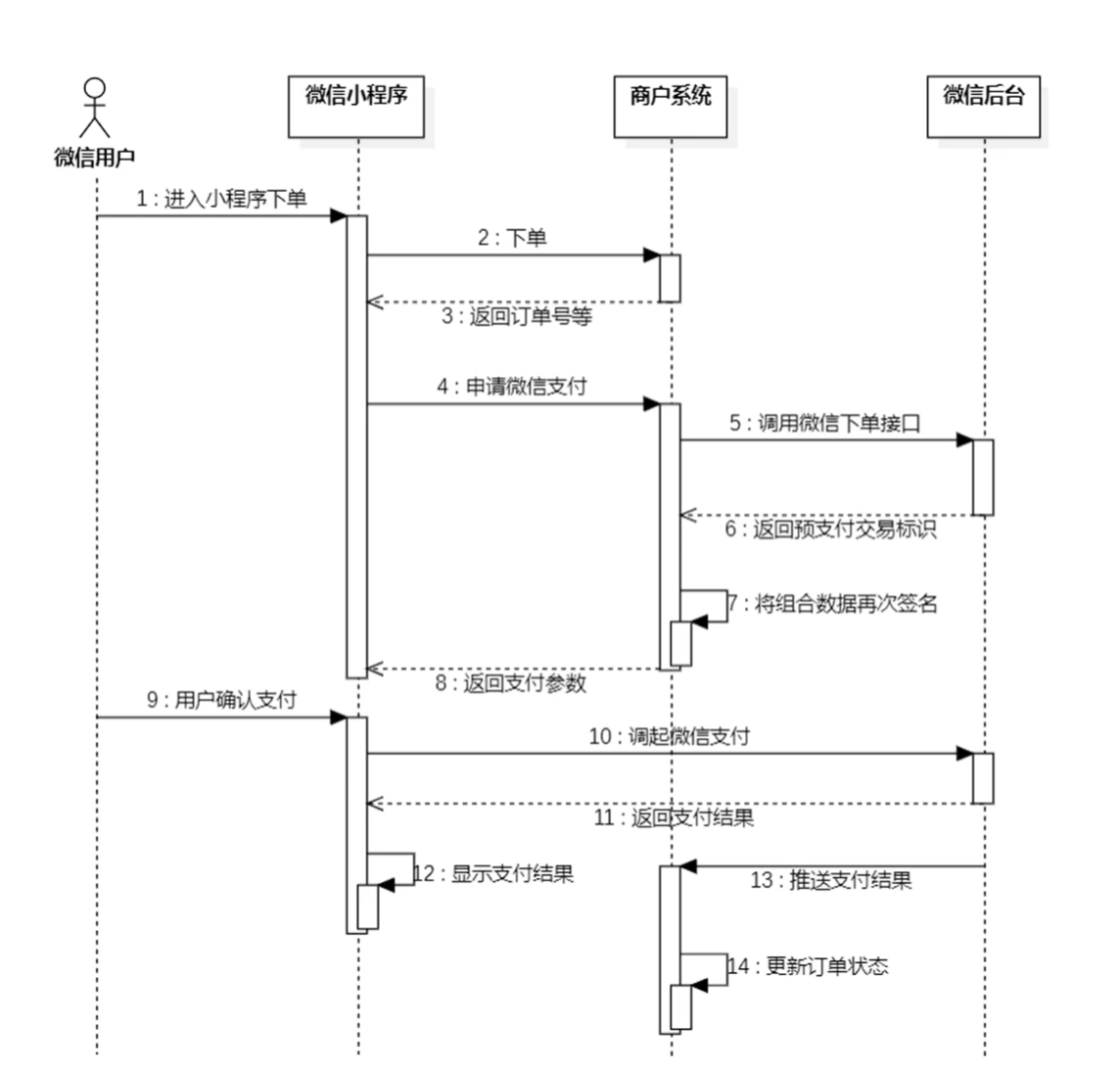
2. 订单支付 2.1 微信支付流程
2.2 代码导入 2.2.1 Mapper层 在OrderMapper.java中添加getByNumberAndUserId和update两个方法
1 2 3 4 5 6 7 8 9 10 11 12 13 @Select("select * from orders where number = #{orderNumber} and user_id= #{userId}") getByNumberAndUserId (String orderNumber, Long userId) ;void update (Orders orders) ;
在OrderMapper.xml中添加
1 2 3 4 5 6 7 8 9 10 11 12 13 14 15 16 17 18 19 20 21 22 23 24 25 26 27 28 29 30 <update id ="update" parameterType ="com.sky.entity.Orders" > <set > <if test ="cancelReason != null and cancelReason!='' " > </if > <if test ="rejectionReason != null and rejectionReason!='' " > </if > <if test ="cancelTime != null" > </if > <if test ="payStatus != null" > </if > <if test ="payMethod != null" > </if > <if test ="checkoutTime != null" > </if > <if test ="status != null" > </if > <if test ="deliveryTime != null" > </if > </set > </update >
2.2.2 Service层 在OrderService.java中添加payment和paySuccess两个方法定义
1 2 3 4 5 6 7 8 9 10 11 12 payment (OrdersPaymentDTO ordersPaymentDTO) throws Exception;void paySuccess (String outTradeNo) ;
在OrderServiceImpl.java中实现payment和paySuccess两个方法
1 2 3 4 5 6 7 8 9 10 11 12 13 14 15 16 17 18 19 20 21 22 23 24 25 26 27 28 29 30 31 32 33 34 35 36 37 38 39 40 41 42 43 44 45 46 47 48 49 50 51 52 53 54 55 @Autowired private UserMapper userMapper;@Autowired private WeChatPayUtil weChatPayUtil;public OrderPaymentVO payment (OrdersPaymentDTO ordersPaymentDTO) throws Exception {Long userId = BaseContext.getCurrentId();User user = userMapper.getById(userId);JSONObject jsonObject = weChatPayUtil.pay(new BigDecimal (0.01 ), "苍穹外卖订单" , if (jsonObject.getString("code" ) != null && jsonObject.getString("code" ).equals("ORDERPAID" )) {throw new OrderBusinessException ("该订单已支付" );OrderPaymentVO vo = jsonObject.toJavaObject(OrderPaymentVO.class);"package" ));return vo;public void paySuccess (String outTradeNo) {Long userId = BaseContext.getCurrentId();Orders ordersDB = orderMapper.getByNumberAndUserId(outTradeNo, userId);Orders orders = Orders.builder()
2.2.3 Controller层 在OrderController.java中添加payment方法
1 2 3 4 5 6 7 8 9 10 11 12 13 14 @PutMapping("/payment") @ApiOperation("订单支付") public Result<OrderPaymentVO> payment (@RequestBody OrdersPaymentDTO ordersPaymentDTO) throws Exception {"订单支付:{}" , ordersPaymentDTO);OrderPaymentVO orderPaymentVO = orderService.payment(ordersPaymentDTO);"生成预支付交易单:{}" , orderPaymentVO);return Result.success(orderPaymentVO);
导入PayNotifyController.java
2.3 跳过微信支付 跳过微信支付
十三. 用户端历史订单模块 1. 历史订单查询 1.1 user/OrderController 1 2 3 4 5 6 7 8 9 10 11 12 13 14 @GetMapping("/historyOrders") @ApiOperation("历史订单查询") public Result<PageResult> page (int page, int pageSize, Integer status) {PageResult pageResult = orderService.pageQuery4User(page, pageSize, status);return Result.success(pageResult);
1.2 OrderService 1 2 3 4 5 6 7 8 pageQuery4User (int page, int pageSize, Integer status) ;
1.3 OrderServiceImpl 1 2 3 4 5 6 7 8 9 10 11 12 13 14 15 16 17 18 19 20 21 22 23 24 25 26 27 28 29 30 31 32 33 34 35 36 37 38 public PageResult pageQuery4User (int pageNum, int pageSize, Integer status) {OrdersPageQueryDTO ordersPageQueryDTO = new OrdersPageQueryDTO ();new ArrayList ();if (page != null && page.getTotal() > 0 ) {for (Orders orders : page) {Long orderId = orders.getId();OrderVO orderVO = new OrderVO ();return new PageResult (page.getTotal(), list);
1.4 OrderMapper 1 2 3 4 5 pageQuery (OrdersPageQueryDTO ordersPageQueryDTO) ;
1.5 OrderMapper.xml 1 2 3 4 5 6 7 8 9 10 11 12 13 14 15 16 17 18 19 20 21 22 23 24 <select id ="pageQuery" resultType ="Orders" > <where > <if test ="number != null and number!=''" > </if > <if test ="phone != null and phone!=''" > </if > <if test ="userId != null" > </if > <if test ="status != null" > </if > <if test ="beginTime != null" > > = #{beginTime}</if > <if test ="endTime != null" > < = #{endTime}</if > </where > </select >
1.6 OrderDetailMapper 1 2 3 4 5 6 7 @Select("select * from order_detail where order_id = #{orderId}") getByOrderId (Long orderId) ;
2. 查询订单详情 2.1 user/OrderController 1 2 3 4 5 6 7 8 9 10 11 12 @GetMapping("/orderDetail/{id}") @ApiOperation("查询订单详情") public Result<OrderVO> details (@PathVariable("id") Long id) {OrderVO orderVO = orderService.details(id);return Result.success(orderVO);
2.2 OrderService 1 2 3 4 5 6 details (Long id) ;
2.3 OrderServiceImpl 1 2 3 4 5 6 7 8 9 10 11 12 13 14 15 16 17 18 19 20 public OrderVO details (Long id) {Orders orders = orderMapper.getById(id);OrderVO orderVO = new OrderVO ();return orderVO;
2.4 OrderMapper 1 2 3 4 5 6 @Select("select * from orders where id=#{id}") getById (Long id) ;
3. 取消订单 3.1 user/OrderController 1 2 3 4 5 6 7 8 9 10 11 @PutMapping("/cancel/{id}") @ApiOperation("取消订单") public Result cancel (@PathVariable("id") Long id) throws Exception {return Result.success();
3.2 OrderService 1 2 3 4 5 void userCancelById (Long id) throws Exception;
3.3 OrderServiceImpl 1 2 3 4 5 6 7 8 9 10 11 12 13 14 15 16 17 18 19 20 21 22 23 24 25 26 27 28 29 30 31 32 33 34 35 36 37 38 39 40 41 public void userCancelById (Long id) throws Exception {Orders ordersDB = orderMapper.getById(id);if (ordersDB == null ) {throw new OrderBusinessException (MessageConstant.ORDER_NOT_FOUND);if (ordersDB.getStatus() > 2 ) {throw new OrderBusinessException (MessageConstant.ORDER_STATUS_ERROR);Orders orders = new Orders ();if (ordersDB.getStatus().equals(Orders.TO_BE_CONFIRMED)) {new BigDecimal (0.01 ),new BigDecimal (0.01 ));"用户取消" );
4. 再来一单 4.1 user/OrderController 1 2 3 4 5 6 7 8 9 10 11 12 @PostMapping("/repetition/{id}") @ApiOperation("再来一单") public Result repetition (@PathVariable Long id) {return Result.success();
4.2 OrderService 1 2 3 4 5 6 void repetition (Long id) ;
4.3 OrderServiceImpl 1 2 3 4 5 6 7 8 9 10 11 12 13 14 15 16 17 18 19 20 21 22 23 24 25 26 27 public void repetition (Long id) {Long userId = BaseContext.getCurrentId();ShoppingCart shoppingCart = new ShoppingCart ();"id" );return shoppingCart;
1 2 3 4 5 6 void insertBatch (List<ShoppingCart> shoppingCartList) ;
1 2 3 4 5 6 7 8 <insert id ="insertBatch" parameterType ="list" > <foreach collection ="shoppingCartList" item ="sc" separator ="," > </foreach > </insert >
十四. 商家端订单管理模块 1. 订单搜索 1.1 admin/OrderController 在admin包下创建OrderController
1 2 3 4 5 6 7 8 9 10 11 12 13 14 15 16 17 18 19 20 21 22 23 24 25 @RestController("adminOrderController") @RequestMapping("/admin/order") @Slf4j @Api(tags = "订单管理接口") public class OrderController {@Autowired private OrderService orderService;@GetMapping("/conditionSearch") @ApiOperation("订单搜索") public Result<PageResult> conditionSearch (OrdersPageQueryDTO ordersPageQueryDTO) {PageResult pageResult = orderService.conditionSearch(ordersPageQueryDTO);return Result.success(pageResult);
1.2 OrderService 1 2 3 4 5 6 conditionSearch (OrdersPageQueryDTO ordersPageQueryDTO) ;
1.3 OrderServiceImpl 1 2 3 4 5 6 7 8 9 10 11 12 13 14 15 16 17 18 19 20 21 22 23 24 25 26 27 28 29 30 31 32 33 34 35 36 37 38 39 40 41 42 43 44 45 46 47 48 49 50 51 52 53 54 55 56 public PageResult conditionSearch (OrdersPageQueryDTO ordersPageQueryDTO) {return new PageResult (page.getTotal(), orderVOList);private List<OrderVO> getOrderVOList (Page<Orders> page) {new ArrayList <>();if (!CollectionUtils.isEmpty(ordersList)) {for (Orders orders : ordersList) {OrderVO orderVO = new OrderVO ();String orderDishes = getOrderDishesStr(orders);return orderVOList;private String getOrderDishesStr (Orders orders) {String orderDish = x.getName() + "*" + x.getNumber() + ";" ;return orderDish;return String.join("" , orderDishList);
2. 各个状态的订单数量统计 2.1 admin/OrderController 1 2 3 4 5 6 7 8 9 10 11 @GetMapping("/statistics") @ApiOperation("各个状态的订单数量统计") public Result<OrderStatisticsVO> statistics () {OrderStatisticsVO orderStatisticsVO = orderService.statistics();return Result.success(orderStatisticsVO);
2.2 OrderService 1 2 3 4 5 statistics () ;
2.3 OrderServiceImpl 1 2 3 4 5 6 7 8 9 10 11 12 13 14 15 16 17 18 public OrderStatisticsVO statistics () {Integer toBeConfirmed = orderMapper.countStatus(Orders.TO_BE_CONFIRMED);Integer confirmed = orderMapper.countStatus(Orders.CONFIRMED);Integer deliveryInProgress = orderMapper.countStatus(Orders.DELIVERY_IN_PROGRESS);OrderStatisticsVO orderStatisticsVO = new OrderStatisticsVO ();return orderStatisticsVO;
2.4 OrderMapper 1 2 3 4 5 6 @Select("select count(id) from orders where status = #{status}") countStatus (Integer status) ;
3. 查询订单详情 3.1 admin/OrderController 1 2 3 4 5 6 7 8 9 10 11 12 @GetMapping("/details/{id}") @ApiOperation("查询订单详情") public Result<OrderVO> details (@PathVariable("id") Long id) {OrderVO orderVO = orderService.details(id);return Result.success(orderVO);
4. 接单 4.1 admin/OrderController 1 2 3 4 5 6 7 8 9 10 11 @PutMapping("/confirm") @ApiOperation("接单") public Result confirm (@RequestBody OrdersConfirmDTO ordersConfirmDTO) {return Result.success();
4.2 OrderService 1 2 3 4 5 6 void confirm (OrdersConfirmDTO ordersConfirmDTO) ;
4.3 OrderServiceImpl 1 2 3 4 5 6 7 8 9 10 11 12 13 public void confirm (OrdersConfirmDTO ordersConfirmDTO) {Orders orders = Orders.builder()
5. 拒单 5.1 admin/OrderController 1 2 3 4 5 6 7 8 9 10 11 @PutMapping("/rejection") @ApiOperation("拒单") public Result rejection (@RequestBody OrdersRejectionDTO ordersRejectionDTO) throws Exception {return Result.success();
5.2 OrderService 1 2 3 4 5 6 void rejection (OrdersRejectionDTO ordersRejectionDTO) throws Exception;
5.3 OrderServiceImpl 1 2 3 4 5 6 7 8 9 10 11 12 13 14 15 16 17 18 19 20 21 22 23 24 25 26 27 28 29 30 31 32 33 34 35 public void rejection (OrdersRejectionDTO ordersRejectionDTO) throws Exception {Orders ordersDB = orderMapper.getById(ordersRejectionDTO.getId());if (ordersDB == null || !ordersDB.getStatus().equals(Orders.TO_BE_CONFIRMED)) {throw new OrderBusinessException (MessageConstant.ORDER_STATUS_ERROR);Integer payStatus = ordersDB.getPayStatus();if (payStatus == Orders.PAID) {String refund = weChatPayUtil.refund(new BigDecimal (0.01 ),new BigDecimal (0.01 ));"申请退款:{}" , refund);Orders orders = new Orders ();
6. 取消订单 6.1 admin/OrderController 1 2 3 4 5 6 7 8 9 10 11 @PutMapping("/cancel") @ApiOperation("取消订单") public Result cancel (@RequestBody OrdersCancelDTO ordersCancelDTO) throws Exception {return Result.success();
6.2 OrderService 1 2 3 4 5 6 void cancel (OrdersCancelDTO ordersCancelDTO) throws Exception;
6.3 OrderServiceImpl 1 2 3 4 5 6 7 8 9 10 11 12 13 14 15 16 17 18 19 20 21 22 23 24 25 26 27 28 29 public void cancel (OrdersCancelDTO ordersCancelDTO) throws Exception {Orders ordersDB = orderMapper.getById(ordersCancelDTO.getId());Integer payStatus = ordersDB.getPayStatus();if (payStatus == 1 ) {String refund = weChatPayUtil.refund(new BigDecimal (0.01 ),new BigDecimal (0.01 ));"申请退款:{}" , refund);Orders orders = new Orders ();
7. 派送订单 7.1 admin/OrderController 1 2 3 4 5 6 7 8 9 10 11 @PutMapping("/delivery/{id}") @ApiOperation("派送订单") public Result delivery (@PathVariable("id") Long id) {return Result.success();
7.2 OrderService 1 2 3 4 5 6 void delivery (Long id) ;
7.3 OrderServiceImpl 1 2 3 4 5 6 7 8 9 10 11 12 13 14 15 16 17 18 19 20 21 public void delivery (Long id) {Orders ordersDB = orderMapper.getById(id);if (ordersDB == null || !ordersDB.getStatus().equals(Orders.CONFIRMED)) {throw new OrderBusinessException (MessageConstant.ORDER_STATUS_ERROR);Orders orders = new Orders ();
8. 完成订单 8.1 admin/OrderController 1 2 3 4 5 6 7 8 9 10 11 @PutMapping("/complete/{id}") @ApiOperation("完成订单") public Result complete (@PathVariable("id") Long id) {return Result.success();
8.2 OrderService 1 2 3 4 5 6 void complete (Long id) ;
8.3 OrderServiceImpl 1 2 3 4 5 6 7 8 9 10 11 12 13 14 15 16 17 18 19 20 21 22 public void complete (Long id) {Orders ordersDB = orderMapper.getById(id);if (ordersDB == null || !ordersDB.getStatus().equals(Orders.DELIVERY_IN_PROGRESS)) {throw new OrderBusinessException (MessageConstant.ORDER_STATUS_ERROR);Orders orders = new Orders ();
十五. Spring Task 和 订单状态定时处理 1. Spring Task 1.1 介绍
Spring Task 是Spring框架提供的任务调度工具,可以按照约定的时间自动执行某个代码逻辑。作用 定时自动执行某段Java代码
1.2 cron表达式 cron表达式 其实就是一个字符串,通过cron表达式可以定义任务触发的时间
**构成规则:**分为6或7个域,由空格分隔开,每个域代表一个含义
每个域的含义分别为:秒、分钟、小时、日、月、周、年(可选)
举例:
2022年10月12日上午9点整 对应的cron表达式为:0 0 9 12 10 ? 2022
1.3 Spring Task使用步骤
导入maven坐标 spring-context
启动类添加注解 @EnableScheduling 开启任务调度
自定义定时任务类
2. 订单状态定时处理 2.1 问题分析
下单后未支付,订单一直处于**“待支付”**状态
用户收货后管理端未点击完成按钮,订单一直处于**“派送中”**状态
对于上面两种情况需要通过定时任务 来修改订单状态,具体逻辑为:
通过定时任务每分钟检查一次是否存在支付超时订单(下单后超过15分钟仍未支付则判定为支付超时订单),如果存在则修改订单状态为“已取消”
通过定时任务每天凌晨1点检查一次是否存在“派送中”的订单,如果存在则修改订单状态为“已完成”
2.2 自定义定时任务类OrderTask 1 2 3 4 5 6 7 8 9 10 11 12 13 14 15 16 17 18 19 20 21 22 23 24 25 26 27 28 29 30 31 32 33 34 35 36 37 38 39 40 41 42 43 44 45 46 47 48 49 50 51 package com.sky.task;@Component @Slf4j public class OrderTask {@Autowired private OrderMapper orderMapper;@Scheduled(cron = "0 * * * * ?") public void processTimeoutOrder () {"处理支付超时订单:{}" , new Date ());LocalDateTime time = LocalDateTime.now().plusMinutes(-15 );if (ordersList != null && ordersList.size() > 0 ){"支付超时,自动取消" );@Scheduled(cron = "0 0 1 * * ?") public void processDeliveryOrder () {"处理派送中订单:{}" , new Date ());LocalDateTime time = LocalDateTime.now().plusMinutes(-60 );if (ordersList != null && ordersList.size() > 0 ){
2.3 在OrderMapper接口中扩展方法 1 2 3 4 5 6 7 @Select("select * from orders where status = #{status} and order_time < #{orderTime}") getByStatusAndOrdertimeLT (Integer status, LocalDateTime orderTime) ;
十六. WebSocket 和 用户来单催单提醒 1. WebSocket WebSocket 是基于 TCP 的一种新的网络协议 。它实现了浏览器与服务器全双工通信——浏览器和服务器只需要完成一次握手,两者之间就可以创建持久性 的连接, 并进行双向 数据传输。
HTTP协议和WebSocket协议对比:
HTTP是短连接
WebSocket是长连接
HTTP通信是单向 的,基于请求响应模式
WebSocket支持双向 通信
HTTP和WebSocket底层都是TCP连接
2. 用户来单提醒 2.1 实现思路
通过WebSocket实现管理端页面和服务端保持长连接状态
当客户支付后,调用WebSocket的相关API实现服务端向客户端推送消息
客户端浏览器解析服务端推送的消息,判断是来单提醒还是客户催单,进行相应的消息提示和语音播报
约定服务端发送给客户端浏览器的数据格式为JSON,字段包括:type,orderId,content
type 为消息类型,1为来单提醒 2为客户催单
orderId 为订单id
content 为消息内容
2.2 代码开发 在OrderServiceImpl中注入WebSocketServer对象,修改paySuccess方法,加入如下代码:
1 2 3 4 5 6 7 8 9 10 11 12 13 14 15 16 17 18 19 20 21 22 23 24 25 26 27 28 29 30 31 32 33 @Autowired private WebSocketServer webSocketServer;public void paySuccess (String outTradeNo) {Long userId = BaseContext.getCurrentId();Orders ordersDB = orderMapper.getByNumberAndUserId(outTradeNo, userId);Orders orders = Orders.builder()Map map = new HashMap ();"type" , 1 );"orderId" , orders.getId());"content" , "订单号:" + outTradeNo);
3. 用户催单提醒 3.1 Controller层 根据用户催单的接口定义,在user/OrderController中创建催单方法:
1 2 3 4 5 6 7 8 9 10 11 12 @GetMapping("/reminder/{id}") @ApiOperation("用户催单") public Result reminder (@PathVariable("id") Long id) {return Result.success();
3.2 Service层接口 在OrderService接口中声明reminder方法:
1 2 3 4 5 void reminder (Long id) ;
3.3 Service层实现类 在OrderServiceImpl中实现reminder方法:
1 2 3 4 5 6 7 8 9 10 11 12 13 14 15 16 17 18 19 public void reminder (Long id) {Orders orders = orderMapper.getById(id);if (orders == null ) {throw new OrderBusinessException (MessageConstant.ORDER_NOT_FOUND);Map map = new HashMap ();"type" , 2 );"orderId" , id);"content" , "订单号:" + orders.getNumber());
十七. 数据统计功能 1. 营业额统计 1.1 Controller层 根据接口定义创建ReportController:
1 2 3 4 5 6 7 8 9 10 11 12 13 14 15 16 17 18 19 20 21 22 23 24 25 26 27 28 29 30 31 32 33 34 35 36 37 38 39 40 41 42 43 44 45 package com.sky.controller.admin;import com.sky.result.Result;import com.sky.service.ReportService;import com.sky.vo.TurnoverReportVO;import io.swagger.annotations.Api;import io.swagger.annotations.ApiOperation;import lombok.extern.slf4j.Slf4j;import org.springframework.beans.factory.annotation.Autowired;import org.springframework.format.annotation.DateTimeFormat;import org.springframework.web.bind.annotation.GetMapping;import org.springframework.web.bind.annotation.RequestMapping;import org.springframework.web.bind.annotation.RestController;import java.time.LocalDate;@RestController @RequestMapping("/admin/report") @Slf4j @Api(tags = "统计报表相关接口") public class ReportController {@Autowired private ReportService reportService;@GetMapping("/turnoverStatistics") @ApiOperation("营业额数据统计") public Result<TurnoverReportVO> turnoverStatistics ( @DateTimeFormat(pattern = "yyyy-MM-dd") LocalDate begin, @DateTimeFormat(pattern = "yyyy-MM-dd") LocalDate end) {return Result.success(reportService.getTurnover(begin, end));
1.2 Service层接口 创建ReportService接口,声明getTurnover方法:
1 2 3 4 5 6 7 8 9 10 11 12 13 14 15 package com.sky.service;import com.sky.vo.TurnoverReportVO;import java.time.LocalDate;public interface ReportService {getTurnover (LocalDate beginTime, LocalDate endTime) ;
1.3 Service层实现类 创建ReportServiceImpl实现类,实现getTurnover方法:
1 2 3 4 5 6 7 8 9 10 11 12 13 14 15 16 17 18 19 20 21 22 23 24 25 26 27 28 29 30 31 32 33 34 35 36 37 38 39 40 41 42 43 44 45 46 47 48 49 50 51 52 53 54 55 56 57 58 59 60 package com.sky.service.impl;import com.sky.entity.Orders;import com.sky.mapper.OrderMapper;import com.sky.service.ReportService;import com.sky.vo.TurnoverReportVO;import lombok.extern.slf4j.Slf4j;import org.apache.commons.lang.StringUtils;import org.springframework.beans.factory.annotation.Autowired;import org.springframework.stereotype.Service;import java.time.LocalDate;import java.time.LocalDateTime;import java.time.LocalTime;import java.util.ArrayList;import java.util.HashMap;import java.util.List;import java.util.Map;@Service @Slf4j public class ReportServiceImpl implements ReportService {@Autowired private OrderMapper orderMapper;public TurnoverReportVO getTurnover (LocalDate begin, LocalDate end) {new ArrayList <>();while (!begin.equals(end)){1 );new ArrayList <>();for (LocalDate date : dateList) {LocalDateTime beginTime = LocalDateTime.of(date, LocalTime.MIN);LocalDateTime endTime = LocalDateTime.of(date, LocalTime.MAX);Map map = new HashMap ();"status" , Orders.COMPLETED);"begin" ,beginTime);"end" , endTime);Double turnover = orderMapper.sumByMap(map); null ? 0.0 : turnover;return TurnoverReportVO.builder()"," ))"," ))
1.4 Mapper层 在OrderMapper接口声明sumByMap方法:
1 2 3 4 5 sumByMap (Map map) ;
在OrderMapper.xml文件中编写动态SQL:
1 2 3 4 5 6 7 8 9 10 11 12 13 14 <select id ="sumByMap" resultType ="java.lang.Double" > <where > <if test ="status != null" > </if > <if test ="begin != null" > > = #{begin}</if > <if test ="end != null" > < = #{end}</if > </where > </select >
2. 用户统计 2.1 Controller层 根据接口定义,在ReportController中创建userStatistics方法:
1 2 3 4 5 6 7 8 9 10 11 12 13 14 @GetMapping("/userStatistics") @ApiOperation("用户数据统计") public Result<UserReportVO> userStatistics ( @DateTimeFormat(pattern = "yyyy-MM-dd") LocalDate begin, @DateTimeFormat(pattern = "yyyy-MM-dd") LocalDate end) {return Result.success(reportService.getUserStatistics(begin,end));
2.2 Service层接口 在ReportService接口中声明getUserStatistics方法:
1 2 3 4 5 6 7 getUserStatistics (LocalDate begin, LocalDate end) ;
2.3 Service层实现类 在ReportServiceImpl实现类中实现getUserStatistics方法:
1 2 3 4 5 6 7 8 9 10 11 12 13 14 15 16 17 18 19 20 21 22 23 24 25 26 27 28 29 30 @Override public UserReportVO getUserStatistics (LocalDate begin, LocalDate end) {new ArrayList <>();while (!begin.equals(end)){1 );new ArrayList <>(); new ArrayList <>(); for (LocalDate date : dateList) {LocalDateTime beginTime = LocalDateTime.of(date, LocalTime.MIN);LocalDateTime endTime = LocalDateTime.of(date, LocalTime.MAX);Integer newUser = getUserCount(beginTime, endTime);Integer totalUser = getUserCount(null , endTime);return UserReportVO.builder()"," ))"," ))"," ))
在ReportServiceImpl实现类中创建私有方法getUserCount:
1 2 3 4 5 6 7 8 9 10 11 12 private Integer getUserCount (LocalDateTime beginTime, LocalDateTime endTime) {Map map = new HashMap ();"begin" ,beginTime);"end" , endTime);return userMapper.countByMap(map);
2.4 Mapper层 在UserMapper接口中声明countByMap方法:
1 2 3 4 5 6 countByMap (Map map) ;
在UserMapper.xml文件中编写动态SQL:
1 2 3 4 5 6 7 8 9 10 11 <select id="countByMap" resultType="java.lang.Integer" >count (id) from userif test="begin != null" >if >if test="end != null" >if >
3. 订单统计 3.1 Controller层 在ReportController中根据订单统计接口创建orderStatistics方法:
1 2 3 4 5 6 7 8 9 10 11 12 13 14 15 16 @GetMapping("/ordersStatistics") @ApiOperation("用户数据统计") public Result<OrderReportVO> orderStatistics ( @DateTimeFormat(pattern = "yyyy-MM-dd") LocalDate begin, @DateTimeFormat(pattern = "yyyy-MM-dd") LocalDate end) {return Result.success(reportService.getOrderStatistics(begin,end));
3.2 Service层接口 在ReportService接口中声明getOrderStatistics方法:
1 2 3 4 5 6 7 getOrderStatistics (LocalDate begin, LocalDate end) ;
3.3 Service层实现类 在ReportServiceImpl实现类中实现getOrderStatistics方法:
1 2 3 4 5 6 7 8 9 10 11 12 13 14 15 16 17 18 19 20 21 22 23 24 25 26 27 28 29 30 31 32 33 34 35 36 37 38 39 40 41 42 43 44 45 46 47 48 49 50 public OrderReportVO getOrderStatistics (LocalDate begin, LocalDate end) {new ArrayList <>();while (!begin.equals(end)){1 );new ArrayList <>();new ArrayList <>();for (LocalDate date : dateList) {LocalDateTime beginTime = LocalDateTime.of(date, LocalTime.MIN);LocalDateTime endTime = LocalDateTime.of(date, LocalTime.MAX);Integer orderCount = getOrderCount(beginTime, endTime, null );Integer validOrderCount = getOrderCount(beginTime, endTime, Orders.COMPLETED);Integer totalOrderCount = orderCountList.stream().reduce(Integer::sum).get();Integer validOrderCount = validOrderCountList.stream().reduce(Integer::sum).get();Double orderCompletionRate = 0.0 ;if (totalOrderCount != 0 ){return OrderReportVO.builder()"," ))"," ))"," ))
在ReportServiceImpl实现类中提供私有方法getOrderCount:
1 2 3 4 5 6 7 8 9 10 11 12 13 14 private Integer getOrderCount (LocalDateTime beginTime, LocalDateTime endTime, Integer status) {Map map = new HashMap ();"status" , status);"begin" ,beginTime);"end" , endTime);return orderMapper.countByMap(map);
3.4 Mapper层 在OrderMapper接口中声明countByMap方法:
1 2 3 4 5 countByMap (Map map) ;
在OrderMapper.xml文件中编写动态SQL:
1 2 3 4 5 6 7 8 9 10 11 12 13 14 <select id="countByMap" resultType="java.lang.Integer" >count (id) from ordersif test="status != null" >and status = #{status}if >if test="begin != null" >if >if test="end != null" >if >
4. 销量排名Top10 4.1 Controller层 在ReportController中根据销量排名接口创建top10方法:
1 2 3 4 5 6 7 8 9 10 11 12 13 @GetMapping("/top10") @ApiOperation("销量排名统计") public Result<SalesTop10ReportVO> top10 ( @DateTimeFormat(pattern = "yyyy-MM-dd") LocalDate begin, @DateTimeFormat(pattern = "yyyy-MM-dd") LocalDate end) {return Result.success(reportService.getSalesTop10(begin,end));
4.2 Service层接口 在ReportService接口中声明getSalesTop10方法:
1 2 3 4 5 6 7 getSalesTop10 (LocalDate begin, LocalDate end) ;
4.3 Service层实现类 在ReportServiceImpl实现类中实现getSalesTop10方法:
1 2 3 4 5 6 7 8 9 10 11 12 13 14 15 16 17 18 19 public SalesTop10ReportVO getSalesTop10 (LocalDate begin, LocalDate end) {LocalDateTime beginTime = LocalDateTime.of(begin, LocalTime.MIN);LocalDateTime endTime = LocalDateTime.of(end, LocalTime.MAX);String nameList = StringUtils.join(goodsSalesDTOList.stream().map(GoodsSalesDTO::getName).collect(Collectors.toList()),"," );String numberList = StringUtils.join(goodsSalesDTOList.stream().map(GoodsSalesDTO::getNumber).collect(Collectors.toList()),"," );return SalesTop10ReportVO.builder()
4.4 Mapper层 在OrderMapper接口中声明getSalesTop10方法:
1 2 3 4 5 6 getSalesTop10 (LocalDateTime begin, LocalDateTime end) ;
在OrderMapper.xml文件中编写动态SQL:
1 2 3 4 5 6 7 8 9 10 11 12 13 14 <select id ="getSalesTop10" resultType ="com.sky.dto.GoodsSalesDTO" > <if test ="begin != null" > > = #{begin}</if > <if test ="end != null" > < = #{end}</if > </select >
十八. Apache POI 和 导出运营数据 1. Apache POI 一般情况下,POI 都是用于操作 Excel 文件。
1.1 将数据写入Excel文件 1 2 3 4 5 6 7 8 9 10 11 12 13 14 15 16 17 18 19 20 21 22 23 24 25 26 27 28 29 30 31 32 33 34 35 36 37 38 39 40 41 42 43 44 45 46 47 48 49 package com.sky.test;import org.apache.poi.xssf.usermodel.XSSFCell;import org.apache.poi.xssf.usermodel.XSSFRow;import org.apache.poi.xssf.usermodel.XSSFSheet;import org.apache.poi.xssf.usermodel.XSSFWorkbook;import java.io.File;import java.io.FileInputStream;import java.io.FileOutputStream;public class POITest {public static void write () throws Exception{XSSFWorkbook excel = new XSSFWorkbook ();XSSFSheet sheet = excel.createSheet("itcast" );XSSFRow row1 = sheet.createRow(0 );1 ).setCellValue("姓名" );2 ).setCellValue("城市" );XSSFRow row2 = sheet.createRow(1 );1 ).setCellValue("张三" );2 ).setCellValue("北京" );XSSFRow row3 = sheet.createRow(2 );1 ).setCellValue("李四" );2 ).setCellValue("上海" );FileOutputStream out = new FileOutputStream (new File ("D:\\itcast.xlsx" ));public static void main (String[] args) throws Exception {
1.2 读取Excel文件中的数据 1 2 3 4 5 6 7 8 9 10 11 12 13 14 15 16 17 18 19 20 21 22 23 24 25 26 27 28 29 30 31 32 33 34 35 36 37 38 39 40 41 42 43 44 45 46 47 48 49 package com.sky.test;import org.apache.poi.xssf.usermodel.XSSFCell;import org.apache.poi.xssf.usermodel.XSSFRow;import org.apache.poi.xssf.usermodel.XSSFSheet;import org.apache.poi.xssf.usermodel.XSSFWorkbook;import java.io.File;import java.io.FileInputStream;import java.io.FileOutputStream;public class POITest {public static void read () throws Exception{FileInputStream in = new FileInputStream (new File ("D:\\itcast.xlsx" ));XSSFWorkbook excel = new XSSFWorkbook (in);XSSFSheet sheet = excel.getSheetAt(0 );int lastRowNum = sheet.getLastRowNum();for (int i = 0 ; i <= lastRowNum; i++) {XSSFRow titleRow = sheet.getRow(i);XSSFCell cell1 = titleRow.getCell(1 );String cellValue1 = cell1.getStringCellValue();XSSFCell cell2 = titleRow.getCell(2 );String cellValue2 = cell2.getStringCellValue();" " +cellValue2);public static void main (String[] args) throws Exception {
2. 导出运营数据Excel报表 2.1 实现步骤
设计Excel模板文件
查询近30天的运营数据
将查询到的运营数据写入模板文件
通过输出流将Excel文件下载到客户端浏览器
2.2 Controller层 根据接口定义,在ReportController中创建export方法:
1 2 3 4 5 6 7 8 9 @GetMapping("/export") @ApiOperation("导出运营数据报表") public void export (HttpServletResponse response) {
2.3 Service层接口 在ReportService接口中声明导出运营数据报表的方法:
1 2 3 4 5 void exportBusinessData (HttpServletResponse response) ;
2.4 Service层实现类 在ReportServiceImpl实现类中实现导出运营数据报表的方法:
提前将资料中的运营数据报表模板.xlsx 拷贝到项目的resources/template目录中
1 2 3 4 5 6 7 8 9 10 11 12 13 14 15 16 17 18 19 20 21 22 23 24 25 26 27 28 29 30 31 32 33 34 35 36 37 38 39 40 41 42 43 44 45 46 47 48 49 public void exportBusinessData (HttpServletResponse response) {LocalDate begin = LocalDate.now().minusDays(30 );LocalDate end = LocalDate.now().minusDays(1 );BusinessDataVO businessData = workspaceService.getBusinessData(LocalDateTime.of(begin,LocalTime.MIN), LocalDateTime.of(end, LocalTime.MAX));InputStream inputStream = this .getClass().getClassLoader().getResourceAsStream("template/运营数据报表模板.xlsx" );try {XSSFWorkbook excel = new XSSFWorkbook (inputStream);XSSFSheet sheet = excel.getSheet("Sheet1" );1 ).getCell(1 ).setCellValue(begin + "至" + end);XSSFRow row = sheet.getRow(3 );2 ).setCellValue(businessData.getTurnover());4 ).setCellValue(businessData.getOrderCompletionRate());6 ).setCellValue(businessData.getNewUsers());4 );2 ).setCellValue(businessData.getValidOrderCount());4 ).setCellValue(businessData.getUnitPrice());for (int i = 0 ; i < 30 ; i++) {LocalDate date = begin.plusDays(i);7 + i);1 ).setCellValue(date.toString());2 ).setCellValue(businessData.getTurnover());3 ).setCellValue(businessData.getValidOrderCount());4 ).setCellValue(businessData.getOrderCompletionRate());5 ).setCellValue(businessData.getUnitPrice());6 ).setCellValue(businessData.getNewUsers());ServletOutputStream out = response.getOutputStream();catch (IOException e){
END